In Revelator, Tipalti can be used in two different ways, depending on whether you’re receiving royalties from Revelator or paying your own payees. This guide explains the difference so you can choose the right setup.
How Tipalti accounts work
How the money flows
DSPs (for example, Spotify) pay Revelator. Revelator deducts its distribution fee and issues your statement. Tipalti is the payment gateway that sends the money to your bank, similar to PayPal. It isn’t a bank account.
Payee Tipalti account: receiving royalties
A Payee Tipalti account (sometimes called a “Supplier” account) is created when Revelator invites you to Tipalti. It’s used to receive royalty payments from Revelator into your own account. Creating a Payee account is free: you only enter your bank details.
With this account, you can:
- View payments you’ve received
- Update your bank, PayPal or other payment details
- Submit tax forms and update your personal or company information
| Note This account is only for receiving payments from Revelator. It can’t be used to pay your own artists, labels or other partners. |
| Important The Tipalti account you set up in Payee Settings only receives money. It doesn’t let you pay your own artists. For that, you need a Payor account. |
Payor Tipalti account: paying your own payees
A Payor Tipalti account is separate from your Payee account. It lets you pay your own artists, labels or partners directly from Revelator using Tipalti’s integrated payment system.
With this account, you can:
- Send payments to your payees without leaving Revelator
- Have transactions logged automatically
- Pay in multiple currencies and methods supported by Tipalti
Which one do you need?
| Account | What it’s for | Where you set it up |
|---|---|---|
| Payee | Receiving royalties from Revelator | Account → Payee Settings |
| Payor | Paying your own artists, labels or partners | Account → Integrations → Payments |
- Just receiving royalties from Revelator? Use a Payee account.
- Also paying your own payees from Revelator? Use both a Payee account and a Payor account.
Step 1: Set up a Payee account

- Go to Account → Payee Settings.
- Under Default Payment Method, select Tipalti.
- Complete your address, payment and tax details.
- Wait for Revelator to verify your info before payments can be made.
Learn more: Add payment information in Tipalti
Step 2: Set up a Payor account (optional)
Before you move forward
Using Tipalti as a Payor is optional. Some Revelator clients use Tipalti to automate payouts directly inside the platform, while others export balances and pay their artists, labels or partners through their own banking or payment systems.
Before setting up a Payor account, it’s important to understand:
- Tipalti is a third-party payment provider integrated with Revelator.
- A Payor account is a separate agreement with Tipalti. Expect an onboarding call with Tipalti and a Tipalti fee. After you sign up, Tipalti contacts you to set up the call.
- Tipalti charges separate platform and transaction fees.
- Fees vary depending on payment method, currency, country and account setup.
- Payment processing fees are typically deducted directly by the payment provider, based on the selected payment method.
- With Tipalti, payments and balances are automatically reflected inside Revelator.
- You don’t have to use Tipalti to pay your payees from Revelator.

- Go to Account → Integrations and open the Payments tab. Click Authorize Access
- On the Tipalti card, click Connect, then either connect your existing account or sign up for a new one.
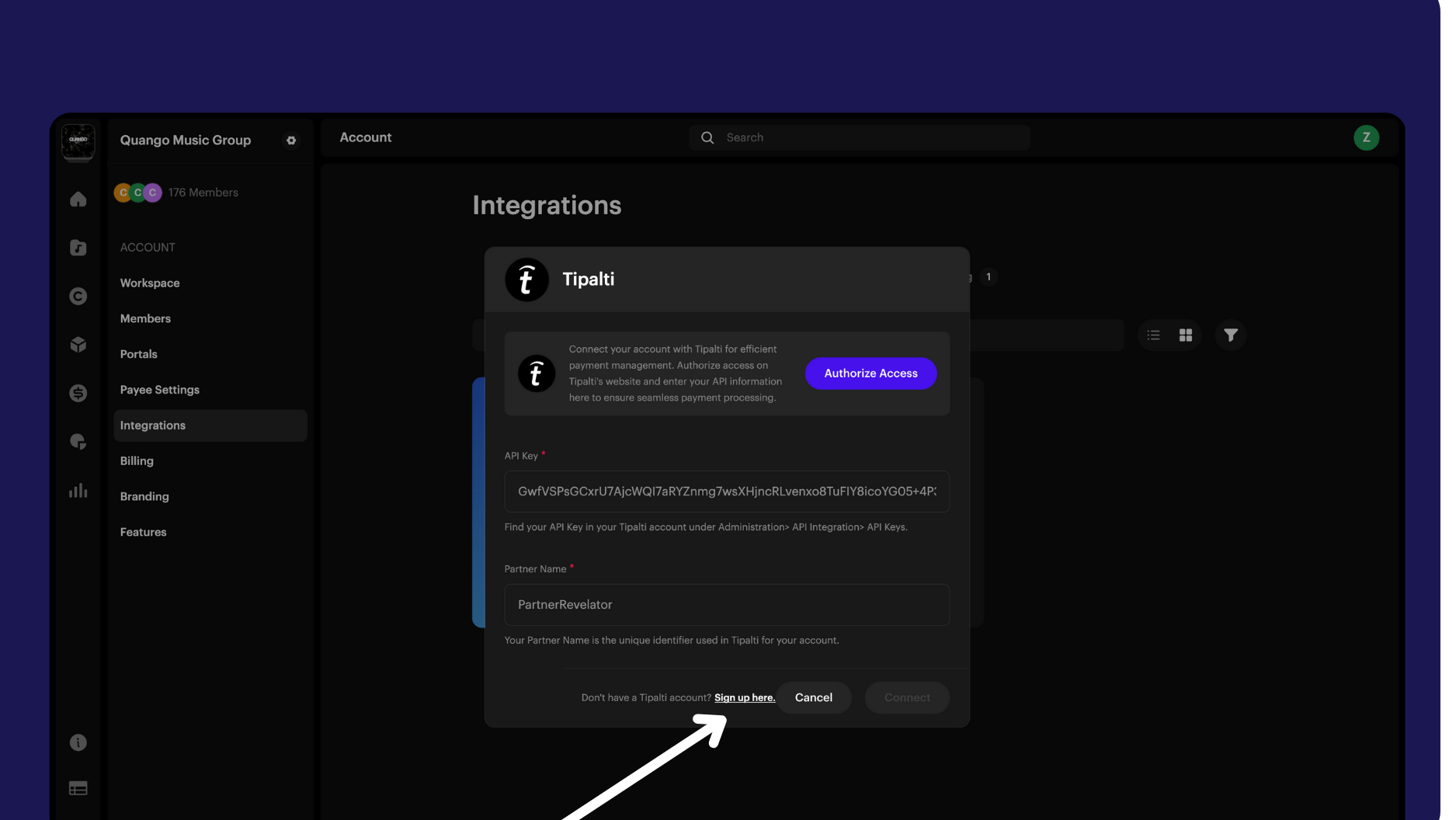
| Note Only your Organization Workspace can connect a Payor account. Client Workspaces and portals don’t see Integrations. |
Learn more: Connect an existing Tipalti Payor account
| Tip If you’re paying others, you’ll likely need to work with your payees on connecting Tipalti and setting their payment preferences. See Connecting payees to Tipalti and Making payments with Tipalti to payees. |
Frequently asked questions
What’s the difference between a Payee and a Payor Tipalti account?
A Payee account is for receiving royalties from Revelator. A Payor account is for paying your own artists, labels or partners.
Do I need both a Payee and a Payor account?
If you only receive royalties from Revelator, you only need a Payee account. If you also pay your own partners, you need both.
Can I use my Payee account to pay my own artists or labels?
No. A Payee account only receives payments from Revelator. To pay others, you need a Payor account.
Can I use the same login for both Payee and Payor accounts?
No. They’re separate accounts with different purposes. You can have both, but they operate independently.
What payment methods are supported through Tipalti?
Tipalti supports multiple options, including bank transfer, PayPal and other methods depending on your country.
How do my payees connect to Tipalti if I’m a Payor?
Once your Payor account is set up, invite your payees. They’ll receive instructions to connect their own Payee accounts and set their payment preferences.
Do my payees pay for a Tipalti account?
No. Your payees follow the invitation link and enter their bank details. They only pay Tipalti’s transaction and currency-conversion fees.
Are there fees for using Tipalti?
Yes. Tipalti charges transaction fees that vary by payment method and country. These are separate from any fees charged by Revelator.
Where can I update my payment or tax details?
If you’re a payee, update them in Account → Payee Settings. If you’re a payor, manage your Tipalti connection in Account → Integrations → Payments.
Related articles
Was this article helpful?
That’s Great!
Thank you for your feedback
Sorry! We couldn't be helpful
Thank you for your feedback
Feedback sent
We appreciate your effort and will try to fix the article