You can edit a release that is Processing in the Distribution Queue. This guide shows you how to pause the delivery, make your changes, and redeliver.
Edit a release that is processing
From the dashboard, follow these steps:
- Go to Catalog and open your release.
- In the left menu, select Distribution → Activity.
- Switch to the Processing tab.
- Select the checkbox in the header row (next to Service) to select all DSPs that are still processing the delivery.
- In the black bar that appears, select Options → Takedown (image below).
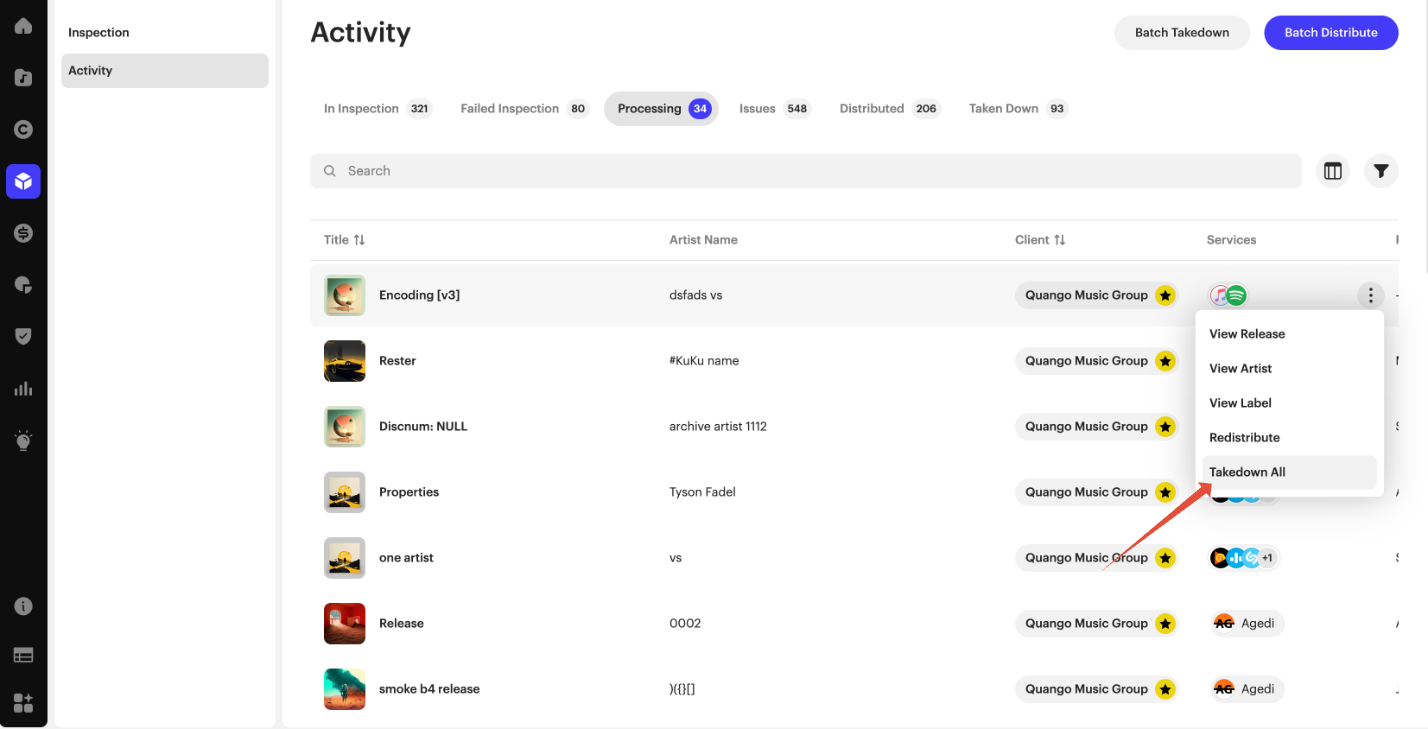
| Important This action will not issue an actual takedown. It only puts the release into a takedown state for DSPs where the delivery is still processing. If you want to perform a full takedown, repeat this process from the Distributed tab. |
- Edit your release as usual.
- Once you've finished making your changes, redeliver the release to all DSPs as needed.
Related articles
Was this article helpful?
That’s Great!
Thank you for your feedback
Sorry! We couldn't be helpful
Thank you for your feedback
Feedback sent
We appreciate your effort and will try to fix the article