This article outlines what you need to prepare before migrating your catalog to Revelator. Our Distribution team handles the migration for you — this checklist simply ensures we have everything in place to get started quickly and cleanly.
Before you begin
|
What you need to provide
Please collect the following deliverables before contacting Support. Most can be prepared in parallel.
1. Your catalog data source
Provide your catalog in one of the following formats:
DDEX (recommended)
DDEX is the most efficient and accurate way to migrate your catalog — it bundles metadata, audio, and artwork together. Place your DDEX packages in a location we can access (SFTP, AWS/S3, Dropbox, Google Drive, or a shared link), and we will import them. Contact Support for our SFTP credentials, then coordinate with your previous distributor to open a feed to Revelator.
Spreadsheet
If DDEX is not available, send a spreadsheet containing at a minimum:
- UPCs
- Release names
- ISRCs
- Track names
- Direct download URLs for audio and artwork files
Media file requirementsWhichever source you use, all media files must meet these standards:
|
2. Account mapping (UPC to PayeeID)
A completed UPC-to-PayeeID mapping tells us which release belongs in which account. Use the template below — make a copy so you can edit it.
Download the UPC to PayeeID template
Finding your Enterprise or Payee ID Go to Clients in Revelator Pro, select the relevant client, and click See Info. This will show the Enterprise ID and Payee ID for that account.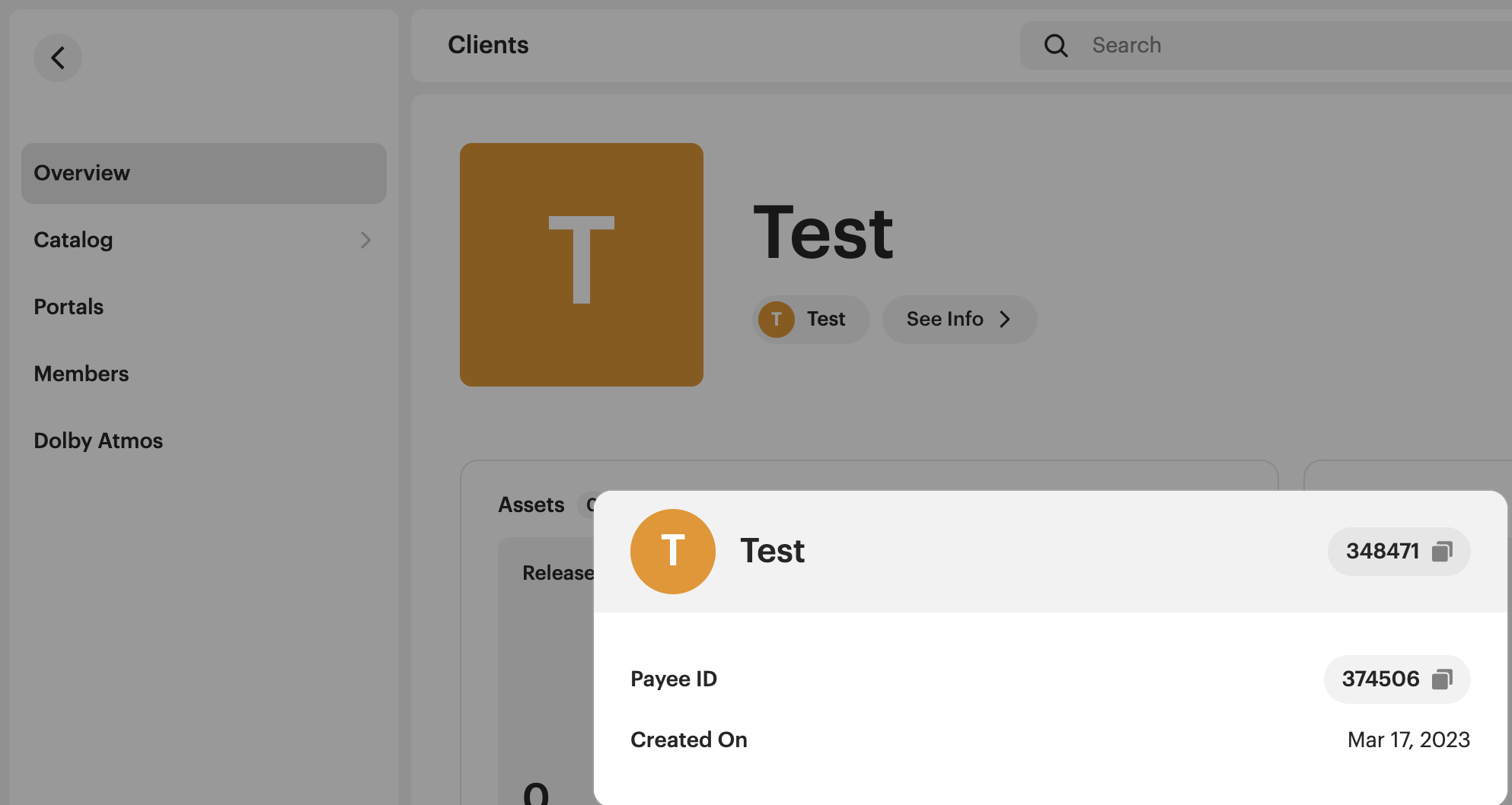 |
3. Metadata export (optional, but strongly recommended for large catalogs)
A metadata export covering any data point not already captured in your catalog data source — for example, contributor credits, composer and publisher details, territorial restrictions, non-default pricing, or future release dates. For large catalogs, this significantly reduces the number of flagged items during review and speeds up the overall ingestion.
Metadata fields to preserve during migration
Keeping certain fields consistent between your old and new distribution is what allows your releases to retain their playlist placements, stream counts, and chart history.
Your onboarding manager will advise you on this in detail, but as a general reference, the fields below are the ones that matter most.
For tracks
- ISRC
- Audio
- Track length
- Title
- Title version
- Artists
- Lyrics language
- Parental advisory
For releases
- UPC
- Track count
- Metadata language
Additional metadata to flag
- Territorial restrictions
- Non-default pricing
- Future release dates (if applicable)
Delivery history
Provide a delivery history export from your previous distributor showing:
- UPC
- DSP name
- Whether each release is currently live
| Note Most distributors can provide this export on request or from within your dashboard. This helps us avoid duplicates and conflicting deliveries. |
UGC DSP eligibility
Some DSPs — including Facebook, Lickd, Snap, TikTok, and YouTube Content ID — are special services that do not authorise all sound recordings. Before migrating, review this article on unauthorised content for UGC DSPs and the Relevance for Distribution section of this article on Track Origin and Track Properties.
If you are using Revelator's deals to distribute to UGC platforms, you will need to tag each track with the correct Track Origin and Track Properties. We can provide a spreadsheet template for batch tagging if needed.
If you are switching from your own UGC deals to Revelator's deals, you must also provide:
- Ineligible content report (Meta/Facebook)
- Invalid reference report (YouTube)
- Violative content report (TikTok)
| Warning Failure to comply with UGC policies may result in your account being blocked from distributing to those DSPs. |
Migration checklist
Use this to confirm you have everything ready before contacting Support.
| Deliverable | Required |
|---|---|
| All Revelator accounts (and child accounts) created | Always |
| Catalog data source ready (DDEX location or spreadsheet) | Always |
| Media files meet format requirements (WAV/FLAC, JPG/PNG) | Always |
| UPC to PayeeID mapping completed | Always |
| Delivery history export provided | Always |
| Metadata export prepared | Optional (recommended for large catalogs) |
| UGC track tagging completed (Track Origin and Track Properties) | If using Revelator's UGC deals |
| UGC content reports submitted (Meta, YouTube, TikTok) | If switching from your own UGC deals |
| Need help with the migration process? For detailed migration planning, per-DSP procedures, and scenario-specific guidance, contact Support — we will walk you through it. |
Related articles
Was this article helpful?
That’s Great!
Thank you for your feedback
Sorry! We couldn't be helpful
Thank you for your feedback
Feedback sent
We appreciate your effort and will try to fix the article