If you have a Merlin deal or a Direct deal with a DSP, you'll need to set up your reporting connection in Revelator to start seeing analytics data. This article walks you through how to connect both daily trends and monthly reporting.
| Note Once your credentials are set up, daily trends data typically appears in your Revelator account within 24–48 hours. |
Daily trends reporting
Please follow the instructions below to connect your daily trends reports to your Revelator account.
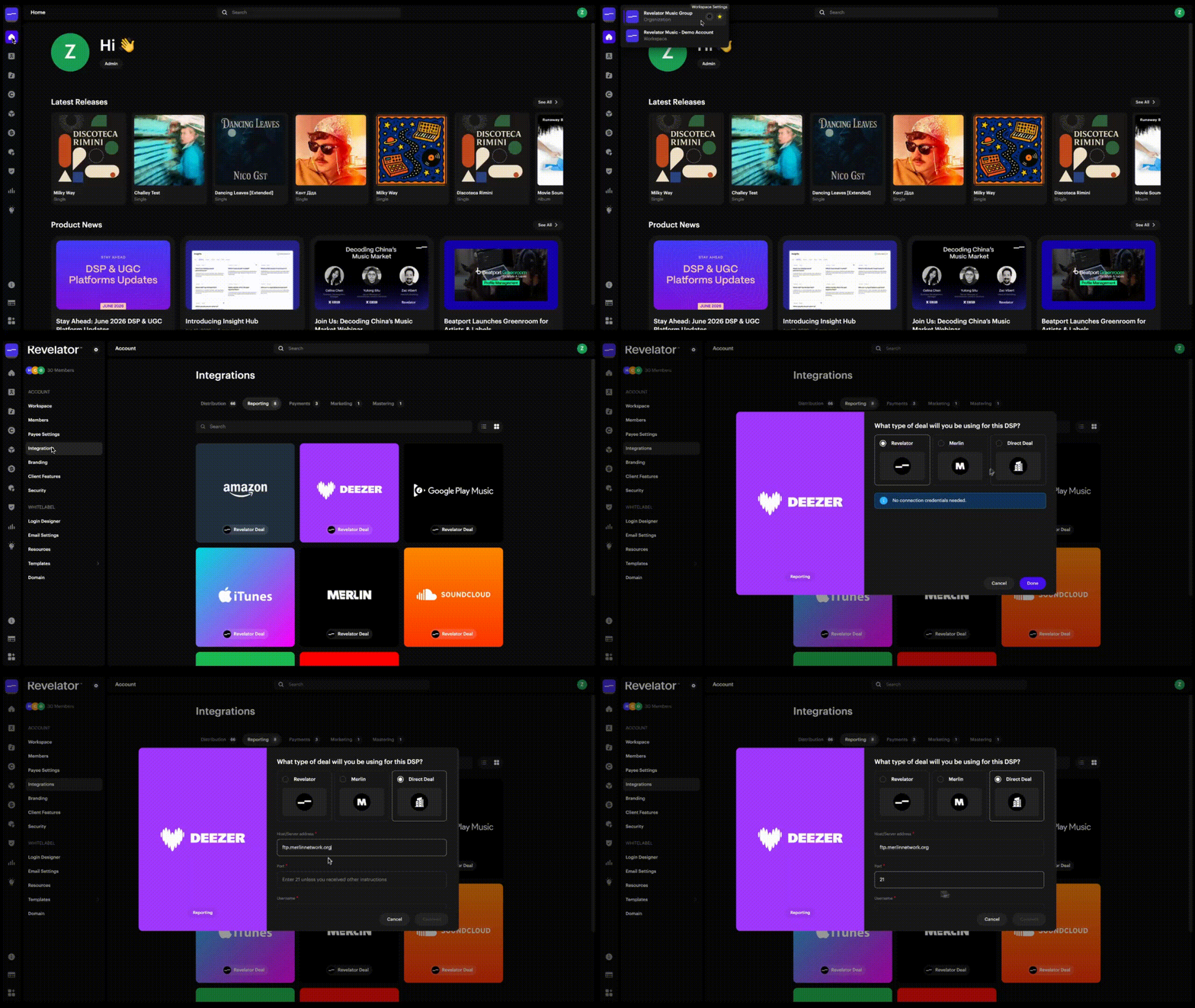
Deezer
- Go to Account Settings → Integrations → Reporting → Deezer
- Select the Direct Deal card (even if you are on a Merlin deal)
- Enter the credentials:
For Merlin deals:
- Host/Server address: ftp.merlinnetwork.org (do not include any prefix like ftpes://)
- Port: 21
- Username and password: provided by Merlin for your FTP access (this is not your Merlin Wizard login)
SoundCloud
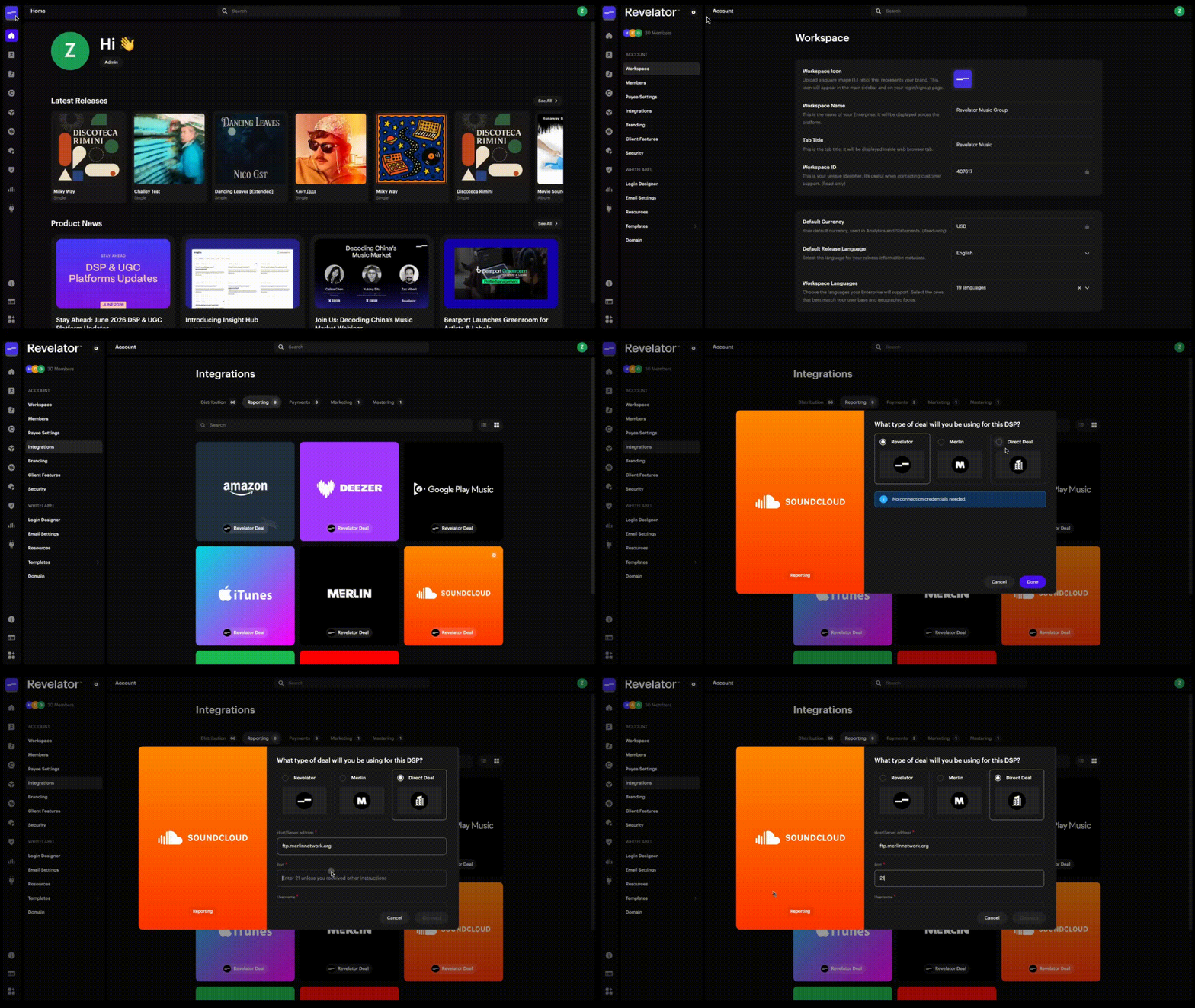
- Go to Account Settings → Integrations → Reporting → SoundCloud
- Select the Direct Deal card (even if you are on a Merlin deal)
- Enter the credentials:
For Merlin deals:
- Host/Server address: ftp.merlinnetwork.org (do not include any prefix like ftpes://)
- Port: 21
- Username and password: provided by Merlin for your FTP access (this is not your Merlin Wizard login)
Apple
- Go to Account Settings → Integrations → Reporting → Apple
- Select the Direct Deal card (even if you are on a Merlin deal)
- Enter the credentials:
For Merlin deals:
- Host/Server address: ftp.merlinnetwork.org (do not include any prefix like ftpes://)
- Port: 21
- Username and password: provided by Merlin for your FTP access (this is not your Merlin Wizard login)
For Direct deals:
You'll need the following from Apple:
- iTunes Username — Revelator may already have this if we deliver to Apple for you. If Revelator does not deliver for you, we recommend creating a new app-specific user rather than using an existing user's credentials. Instructions here.
- iTunes Password — Same as above. Create an app-specific password if Revelator is not delivering for you.
- iTunes Vendor ID— To find this:
- Log into iTunes Connect and click Sales and Trends
- Click Sales and Trends Reports in the bottom left column
- Click your company name (in blue) in the central report area — your Vendor ID is the number next to it
- iTunes Access Tokenand its expiration date — To generate:
- Log into iTunes Connect and click Sales and Trends
- Click Sales and Trends Reports in the left-hand side
- In the upper-right corner, click the tooltip next to About Reports
- Click Generate Reporter Token
- iTunes Account Number — If you don't know this, email Support with items 3 and 4 above and we'll retrieve it for you.
- Apple Music Analytics API key and Issuer ID— To set up:
- Follow the instructions provided here
- Your API key will be a file ending in .p8
- Your Issuer ID will be in this format: E0E3EF8C-7594-324F-BAFD-282D09BAA38F
Once you have all the items above, enter them in Account Settings → Integrations → Reporting → Apple and email Support so we can confirm everything is set up correctly.
ImportantTake note of your iTunes Access Token expiration date. You'll need to:
|
Spotify
Spotify requires Enhanced Bulk API credentials.
If you already have Spotify Enhanced Bulk API credentials:
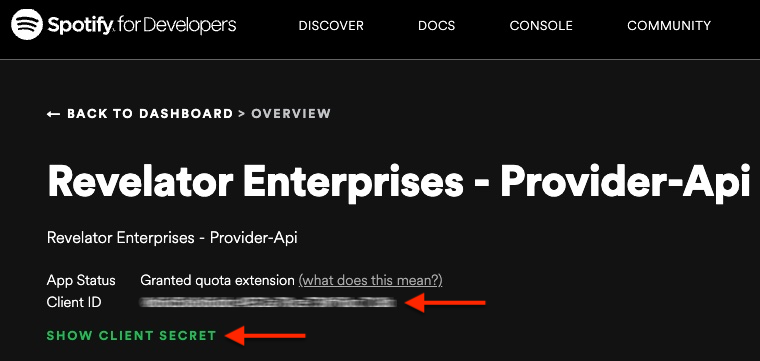
- Go to the Spotify Developer dashboard
- Retrieve your Client ID and Client Secret
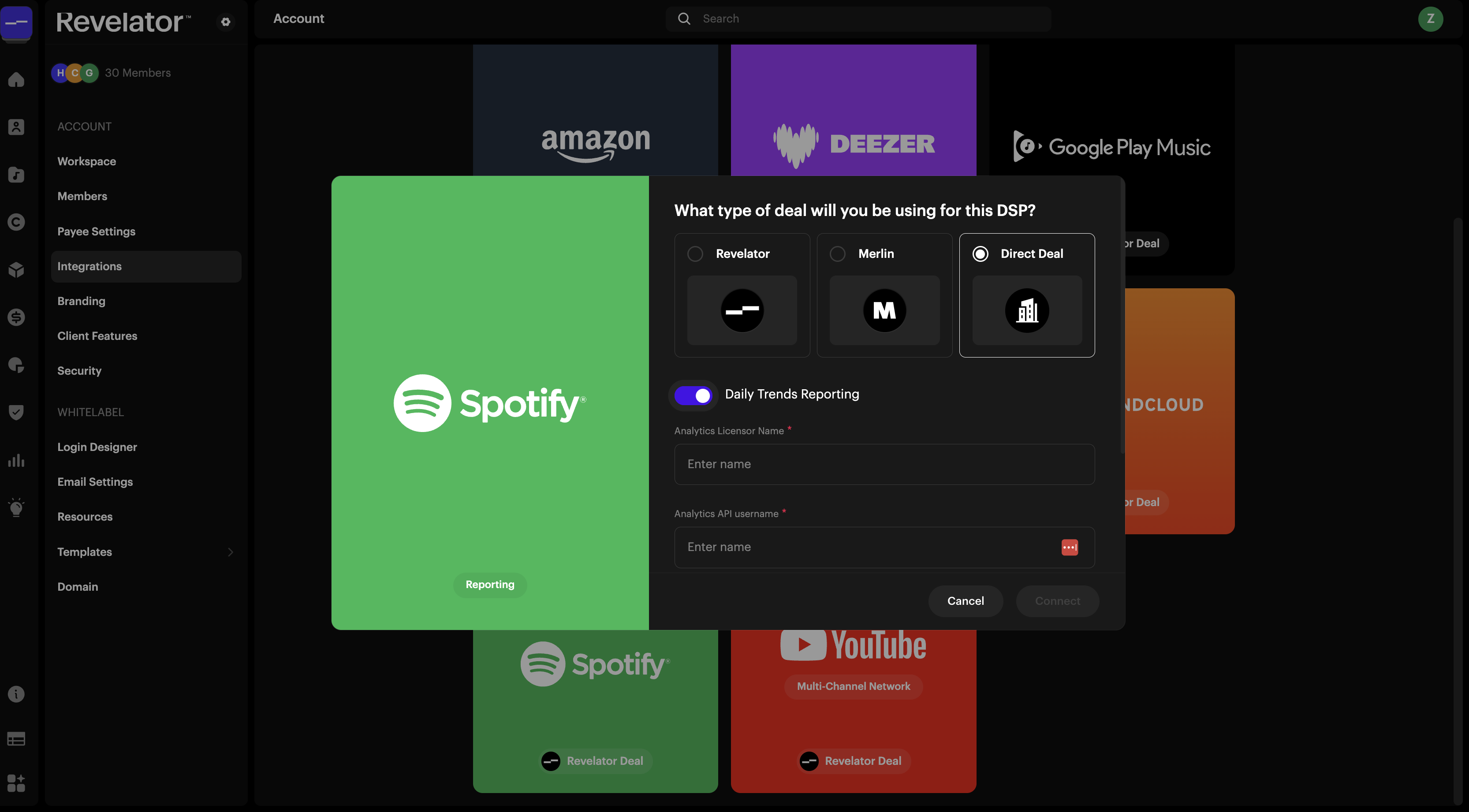
- In Revelator, go to Account Settings → Integrations → Reporting → Spotify
- Select the Direct Deal card (even if you are on a Merlin deal)
- Fill out the following in the Trends section:
- Analytics Licensor Name: your Spotify licensor name
- Analytics API username: your Spotify Client ID
- Analytics API secret/password: your Spotify Client Secret
If you don't have Spotify Enhanced Bulk API credentials yet:
- Email Spotify at analytics-api@spotify.comwith the following:
Subject: Spotify Provider API Access Request – [Your Company Name]
Body: Include the following 3 lines (you only need to enter your information for #1 & #2):
- Spotify account: one of the email addresses associated with your account
- Company name: your company name
- Provider API: Enhanced Bulk API
- Once Spotify issues your credentials, follow the steps above.
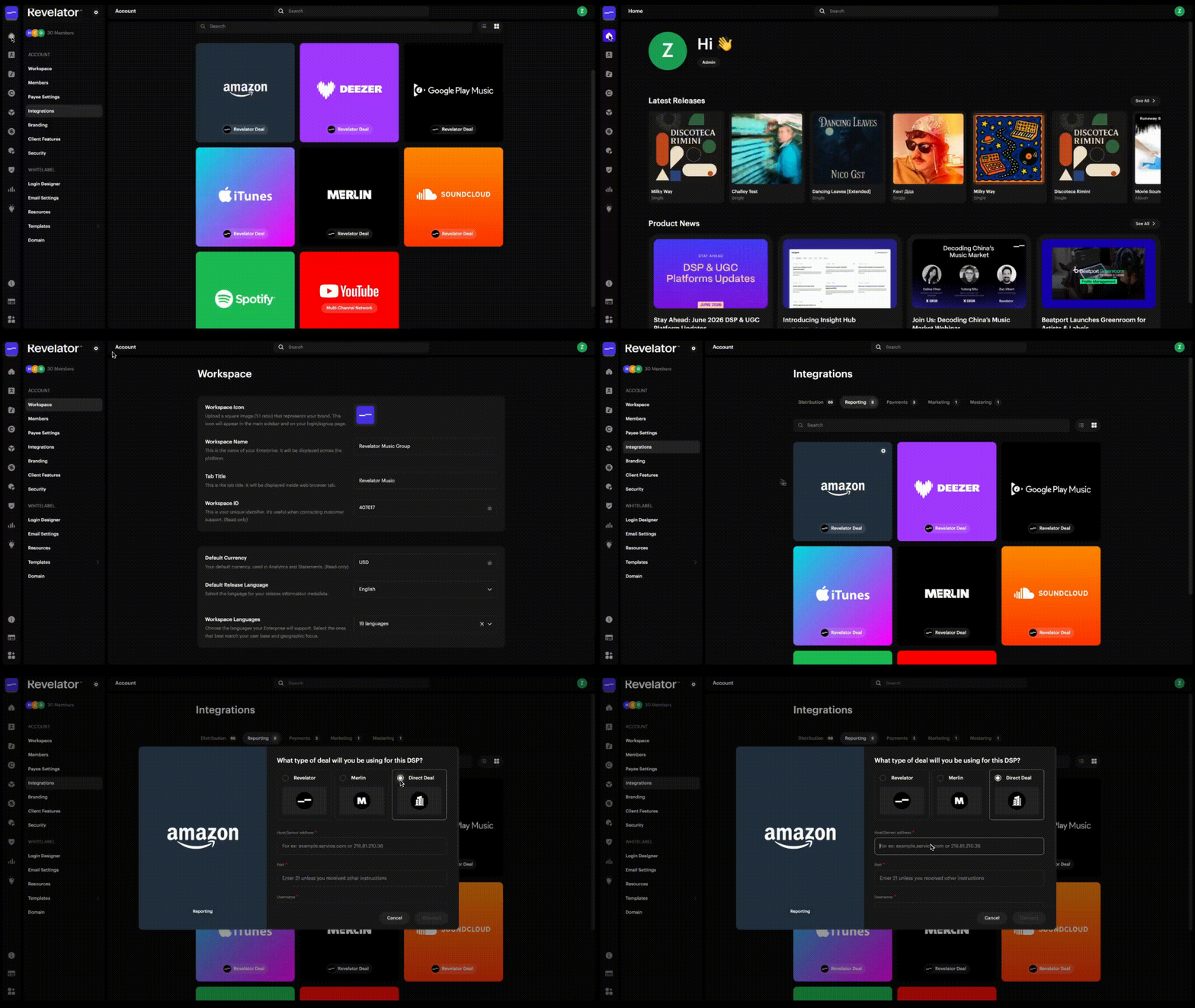
Amazon
- Go to Account Settings → Integrations → Reporting → Amazon
- Select the Direct Deal card (even if you are on a Merlin deal)
- Enter the credentials:
For Merlin and Direct deals:
- Host/Server address: prod.reporting.amazonmusiccatalog.com
- Port: 22
- Username and password: provided by Amazon
TikTok
For TikTok daily trends setup, please contact Revelator Support. We'll provide you with the specific instructions to share with your TikTok representative.
YouTube Content ID
YouTube Content ID data is available in Revelator Pro for:
- Revelator Deal customers — where Revelator delivers your content to YouTube under our Content Owner agreement
- Revelator MCN customers — where your YouTube channels are joined to Revelator's MCN. To opt in, go to Account Settings → Integrations → Reporting → YouTube MCN and contact support to complete the connection.
| Note YouTube CID is not currently supported for Direct deals or Merlin deals. For these configurations, please contact Revelator Support to discuss options. |
Meta, Vevo, AWA
Reports from Meta, Vevo and AWA are also available for Merlin members — automatically ingested once your Merlin FTP credentials are connected for any DSP above.
Monthly reporting
For Merlin members
Revelator's integration with the Merlin Wizard automatically imports your revenue reports. (For more on how reports are processed, see: Reconciling Merlin Reports.)
To set up monthly reporting:
- Go to Account Settings → Integrations → Reporting → Merlin
- Select the Direct Deal card (even if you are on a Merlin deal)
- Enter:
- Host/Server address: ftp.merlinnetwork.org
- Port: 21
- Username and password: your Merlin FTP credentials
For Direct Deal customers
Monthly reporting is set up per DSP using the credentials provided by each DSP.
- Go to Account Settings → Integrations → Reporting
- Select the DSP you want to connect
- Select the Direct Deal card
- Enter the credentials provided by the DSP
Was this article helpful?
That’s Great!
Thank you for your feedback
Sorry! We couldn't be helpful
Thank you for your feedback
Feedback sent
We appreciate your effort and will try to fix the article