Revelator supports nearly 200 different revenue reports from a wide range of DSPs and distributors. This article lists the supported DSPs and distributors and answers common questions about how revenue reports are imported and processed.
What you'll learn
|
Supported DSPs
| Note The list below is reviewed every few months, but Revelator continually adds new supported reports, based on client requests. If you need clarification on a specific report, or would like Revelator to support a new one, contact the support team. |
| DSP name | Merlin | Direct deal | Auto-ingested? |
|---|---|---|---|
| Alibaba | Yes | — | Yes |
| Amazon Music Ads | — | Yes | Yes |
| Amazon Music | — | Yes | Yes |
| Amazon Music Prime | — | Yes | Yes |
| Amazon Music Unlimited | — | Yes | Yes |
| Amazon Music (Japan) | — | Yes | Yes |
| Amazon Prime (India) | — | Yes | Yes |
| Anghami | Yes | — | Yes |
| Apple Fitness Plus | Yes | Yes | Only Merlin |
| Apple Music | Yes | Yes | Only Merlin |
| Apple Music DJ Mix | Yes | Yes | Only Merlin |
| Apple Music Radio | Yes | — | Yes |
| iTunes | Yes | Yes | Only Merlin |
| iTunes Match | Yes | Yes | Only Merlin |
| iTunes Radio | — | Yes | — |
| Audiomack | Yes | Yes | Only Merlin |
| AWA v1 | Yes | — | Yes |
| Beatport | — | Yes | — |
| Boomplay | Yes | Yes | Yes |
| Canva | Yes | — | Yes |
| Deezer | Yes | — | Yes |
| Yes | — | Yes | |
| Flo | Yes | Yes | Only Merlin |
| iHeart | Yes | — | Yes |
| Claro Musica | — | Yes | — |
| Joox | Yes | — | Yes |
| KKBOX | Yes | — | Yes |
| KKBOX UTAPASS | Yes | — | Yes |
| Mixcloud | Yes | — | Yes |
| Netease | Yes | — | Yes |
| Nuuday | Yes | — | Yes |
| Pandora | Yes | — | Yes |
| Peloton | Yes | — | Yes |
| Pretzel | — | Yes | — |
| QOBUZ | — | Yes | — |
| Resso | Yes | — | Yes |
| Rhapsody | — | Yes | — |
| Roxi | Yes | — | Yes |
| Rythm | Yes | — | Yes |
| Saavn | Yes | — | Yes |
| Slacker | Yes | — | Yes |
| Snap | Yes | — | Yes |
| Soundcloud | Yes | — | Yes |
| Soundexchange | — | Yes | — |
| Soundtrack Your Brand | Yes | — | Yes |
| Spotify | Yes | Yes | Only Merlin |
| Tencent | Yes | — | Yes |
| TIDAL | — | Yes | — |
| TikTok | Yes | Yes | Only Merlin |
| TikTok Capcut | Yes | Yes | Only Merlin |
| TikTok Douyin | Yes | — | Yes |
| Trebel | Yes | — | Yes |
| Triller | Yes | — | Yes |
| UMA | Yes | — | Yes |
| Vevo | Yes | — | Yes |
| Yandex | Yes | — | Yes |
| YouTube Ads (Revenue and Adjustments) | Yes | — | Yes |
| YouTube Ads (Summary) | Yes | — | Yes |
| YouTube Audio Tier | — | Yes | — |
| YouTube Claims | — | Yes | — |
| YouTube Shorts | Yes | — | Yes |
| YouTube Video | — | Yes | — |
| YouTube Subscription (Revenue and Adjustments) (aka Music or Red or Premium) | Yes | — | Yes |
Supported distributors
| Distributor | Merlin | Direct deal | Auto-ingested? |
|---|---|---|---|
| Fuga | — | Yes | — |
| Ingrooves | — | Yes | — |
| The Orchard | — | Yes | — |
| Tunecore | — | Yes | — |
| Distrokid | — | Yes | — |
What you need
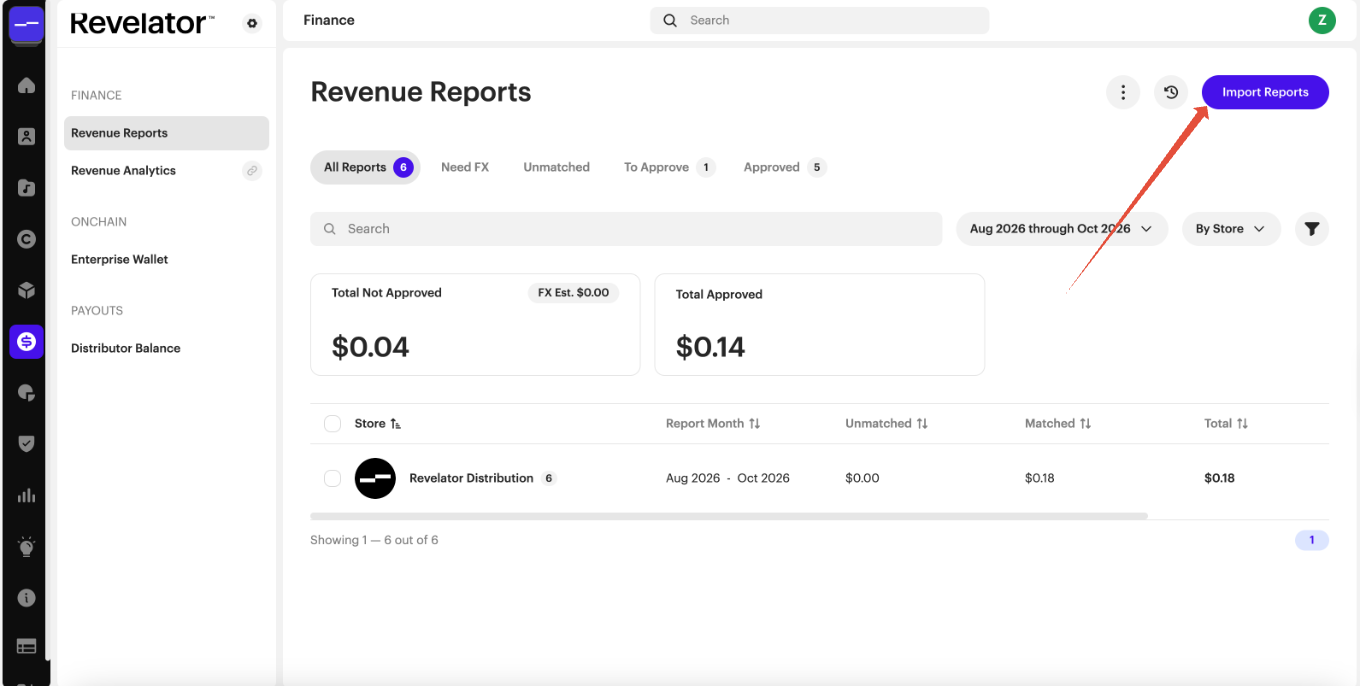
Go to
Finance → Revenue Reports (Import Reports)
Account access
| Account | Access |
|---|---|
| Organization / Tenant | Can view revenue reports (Finance: Viewer). Editors can import and approve them. |
| Client | Doesn't see Revenue Reports or Integrations. |
| Label Portal | Doesn't see Revenue Reports. |
| Artist Portal | Doesn't see Revenue Reports. |
| Payee Portal | Doesn't see Revenue Reports. |
Frequently asked questions
Which reports are automatically imported, and which need to be imported manually?
Only some DSPs give Revelator a way to import your reports automatically:
- All Merlin DSP reports (except YouTube)
- Amazon
- All Apple reports
Spotify is auto-ingested only through Merlin. If you have Merlin or Amazon deals, Revelator syncs those files on its side.
Revelator Distribution Reports appear automatically in Revenue Reports between the 15th and 25th of the month. They contain only matched lines.
All other DSP and distributor reports need to be imported manually with the Import Reports button, under Finance → Revenue Reports.
Some DSPs offer API or SFTP connections for reporting. You can set these up under Account → Integrations.
What is the schedule for automated report ingestion?
All reports that can be imported automatically (see the previous question) are imported within 72 hours of becoming available. Spotify reports (through Merlin) are synced within 48 hours of being posted.
How often does Revelator update the system to support a new format for a specific report?
When an existing report changes format, Revelator may need to update its system to support the new format. Revelator updates its system monthly, usually in the last week of the month. If a report is failing and needs processing sooner than the end of the month, email support.
How long does it take to process a report?
It depends on the size of the report. Most reports process within a few minutes, but larger reports, such as YouTube, can take up to 24 hours, depending on the queue and the report's size. When a report finishes processing, you'll get an email to let you know.
I uploaded a report some time ago, but it hasn't finished processing yet. Can Revelator help?
Yes. Email support so they can check its status and scale the processing queue if needed.
How can I import a report Revelator doesn't currently support?
Use Revelator's revenue report ingestion template. You can also ask whether Revelator can support the report by emailing the support team.
Why can't I approve my report?
The most common reasons are a missing FX rate (when the report's currency differs from your account currency) or unmatched lines. Add the FX rate and match or detach the unmatched lines, then approve.
Related articles
Was this article helpful?
That’s Great!
Thank you for your feedback
Sorry! We couldn't be helpful
Thank you for your feedback
Feedback sent
We appreciate your effort and will try to fix the article