Every track you create needs the right people credited in the right roles — not just for recognition, but because DSPs increasingly require specific contributor and rights information before they'll accept a release. Revelator organizes contributors into clear role categories so your metadata stays consistent and DSP-compliant across your whole catalog.
The six contributor role categories
| Category | Who belongs here |
|---|---|
| Artists | The main and featured performers credited on the release |
| Performers | Session musicians and instrumentalists — guitarist, drummer, and similar track-level roles |
| Producers & Engineers | Producer, mixing engineer, mastering engineer, and similar production credits |
| Writers | Composers, lyricists, and songwriters |
| Labels | The label associated with the release |
| Publishers | The publisher(s) associated with a writer's share |
Adding a contributor to a track
- Open the track in Catalog → Tracks, or add contributors while creating a new track.
- Select Add Contributor and choose a role category.
- Search for an existing contributor or create a new one.
- Repeat for every person or entity involved in the track.

Contributors you create are saved to your account and reusable across your entire catalog — you won't need to re-enter the same producer or session musician on every track.
| Important: a Producer or Engineer credit is required Every release needs at least one Producer or Engineer credited before it can be delivered to Spotify and Apple Music — this is now a mandatory metadata requirement on both platforms, not an optional best practice. If you skip this field, your release may be rejected or delayed at inspection. |
Adding publishing info: writers & publishers
Alongside performing and production credits, every track needs its publishing information — who wrote the composition, how the songwriting is split, and how each writer's share is published. This is what lets royalties flow to the right people and keeps your works registerable with PROs and CMOs.
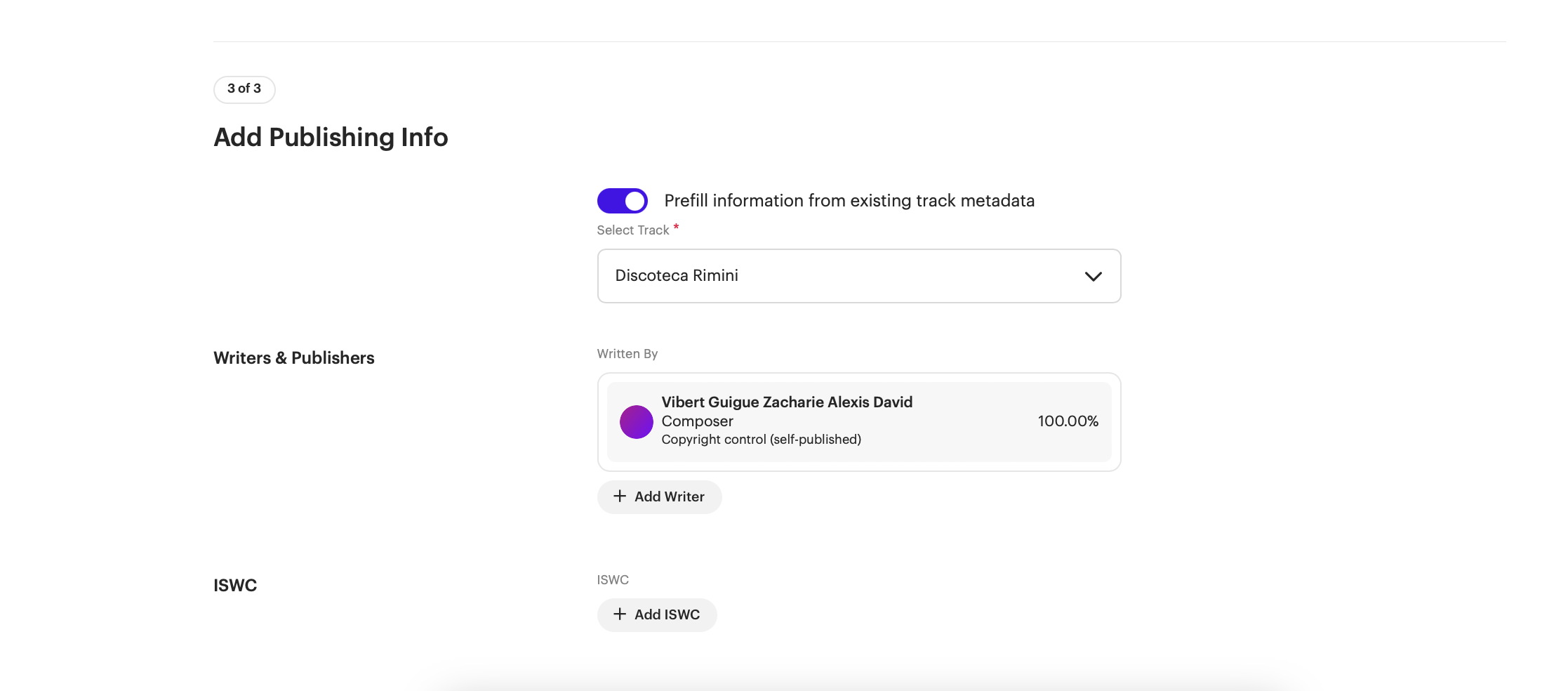
- Open the track and go to Publishing Info, or reach it as the final step (3 of 3 · Add Publishing Info) when creating a release.
- Toggle Prefill information from existing track metadata and choose a track if you'd like to copy writers already entered elsewhere in your catalog.
- Under Writers & Publishers, select Add Writer.
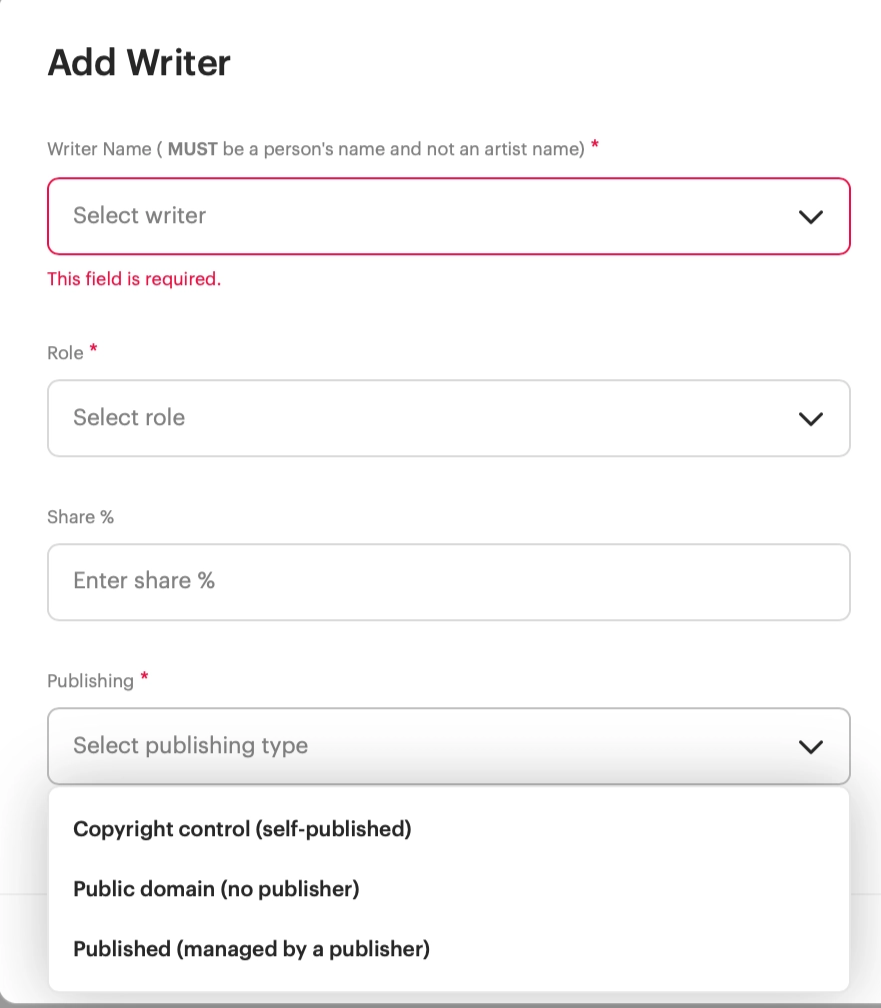
- Complete the writer details (below) and select Add Writer to save. Repeat for every writer on the composition.
Writer details
| Field | What to enter |
|---|---|
| Writer Name | The songwriter's legal person name — not an artist or band name. PROs and publishers match on the individual, so "Jane Smith" rather than a project alias. |
| Role | The writer's contribution to the composition, such as Composer, Lyricist, or Arranger. Choose the option that best describes what they did. |
| Share % | The percentage of the songwriting this writer owns. Shares across all writers on a track should total 100%. |
| Publishing | How this writer's share is published (see the three types below). |
Publishing types
| Type | When to use it |
|---|---|
| Copyright control (self-published) | The writer manages their own publishing and isn't signed to a publisher. |
| Public domain (no publisher) | The composition is in the public domain and has no publisher or rights holder. |
| Published (managed by a publisher) | The writer's share is administered by a publisher, which you'll then credit. |
ISWC
The ISWC (International Standard Musical Work Code) is a unique identifier for a musical composition — the songwriting counterpart to a recording's ISRC. If your work already has one, select Add ISWC and enter it.
ISWC codes are issued by your national or regional ISWC agency, usually through your local copyright office or PRO. Once your composition is registered, you'll receive an ISWC for it. If you don't have one yet, you can leave this blank and add it later — it isn't required to save the track.
Track-level vs. release-level credits
Performer credits (session musicians, instrumentalists) are set at the track level, since different tracks on the same release may have different players. Writer, Publisher, and Producer/Engineer credits typically apply per track as well, so double-check every track on a multi-track release has its own complete contributor list.
Was this article helpful?
That’s Great!
Thank you for your feedback
Sorry! We couldn't be helpful
Thank you for your feedback
Feedback sent
We appreciate your effort and will try to fix the article