When working with large catalogs, finding specific releases or tracks one by one can be slow. Multi-ID Filtering lets you search for multiple releases or tracks at once by pasting a list of UPCs or ISRCs directly into the filter panel.
This is especially useful for operations, support, and catalog management workflows.
Where you can use Multi-ID Filtering
Multi-ID Filtering is available in:
- Catalog → Releases
- Catalog → Tracks
You'll find the filter option in the right-hand filter panel.
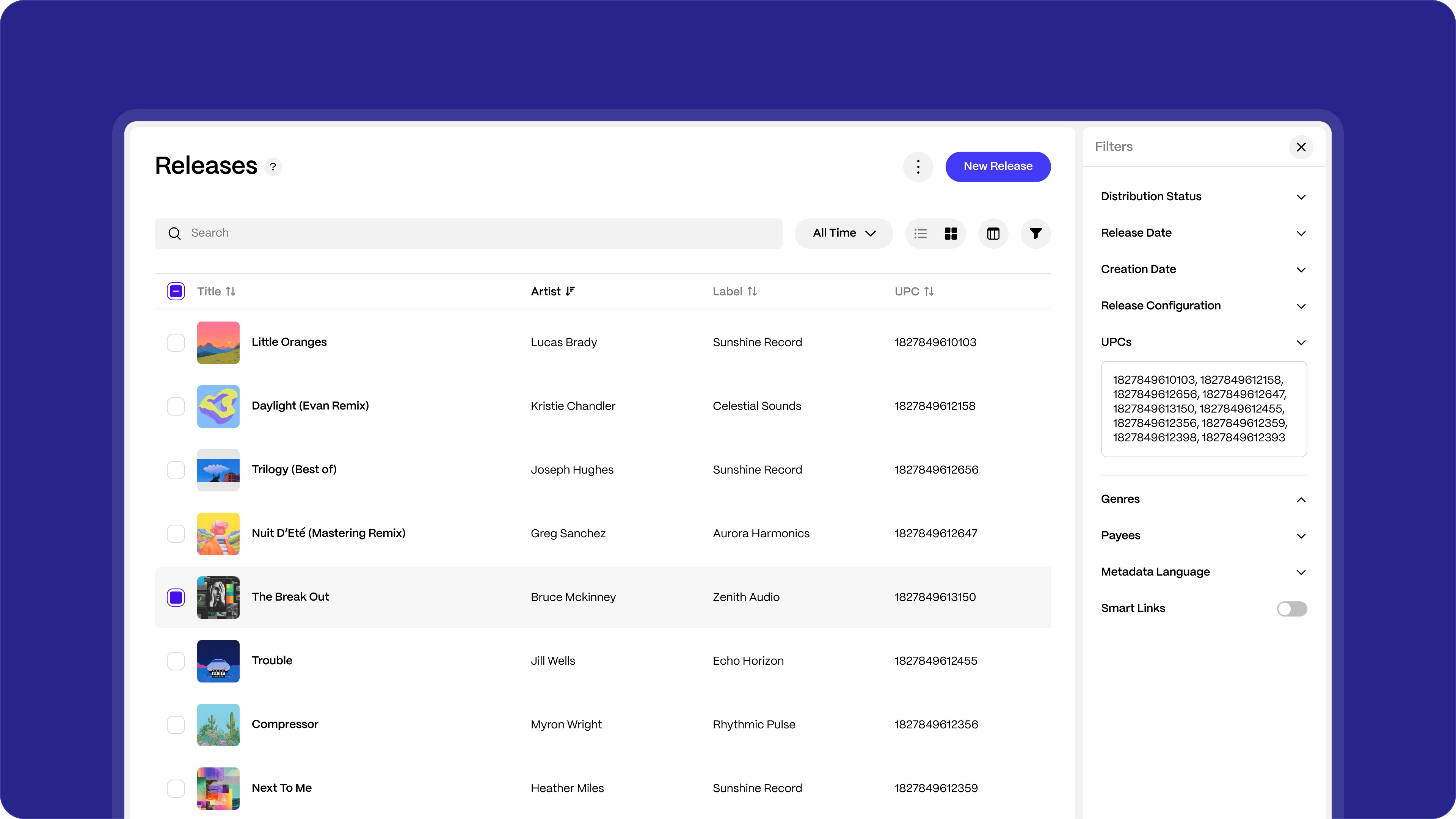
How to use Multi-ID Filtering
- Open Releases or Tracks in the Catalog.
- Open the Filters panel.
- Locate the UPC (for Releases) or ISRC (for Tracks) filter.
- Paste or type multiple IDs into the field.
- Separate each ID with a comma.
- Apply the filter to instantly narrow results.
You can enter up to 20 IDs at once.
Supported input format
- Separate IDs using commas.
- Spaces are ignored automatically.
- The system validates each ID and applies the filter in one step.
Example UPC1, UPC2, UPC3ISRC1, ISRC2, ISRC3 |
What happens after you apply the filter
- Only releases or tracks matching the entered UPCs or ISRCs will be shown.
- You can combine Multi-ID filtering with other filters (label, artist, market, etc.).
- Clearing the filter resets the view to your full catalog.
FAQs
How many IDs can I search at once?
You can filter by up to 20 UPCs or ISRCs in a single search.
Can I mix UPCs and ISRCs in the same search?
No. Use UPCs when filtering Releases and ISRCs when filtering Tracks.
Do I need to format the IDs in a specific way?
No. Simply separate each ID with a comma. The system handles formatting automatically.
Was this article helpful?
That’s Great!
Thank you for your feedback
Sorry! We couldn't be helpful
Thank you for your feedback
Feedback sent
We appreciate your effort and will try to fix the article