This article explains when your music becomes available on TikTok, why a track might not appear or might be muted, and what to check before promoting a track.
When will my music be available in TikTok’s music library?
Your music becomes available as audio clips: excerpts of your tracks that people can select to use in their TikTok videos. Additional clips are other excerpts from the same recording, such as a different hook or chorus.
Audio clips, including any additional clips delivered for the same track, are scheduled to become available on the release date set for TikTok. To make your music available before it launches on other platforms:
- Set an earlier release date specifically for TikTok.
- If the release has already been delivered, redeliver it to TikTok after updating the date.
You can also set an earlier release date for Instagram. See How to set different release dates for different DSPs.
| NoteTikTok can take several business days to process a delivery, so give it a few working days after delivery is confirmed before troubleshooting. Newly available music may not appear in search results immediately. |
Why can’t I find my music on TikTok?
If your track isn’t appearing in TikTok’s music library, check the following:
- Release date: Make sure the release date set for TikTok has arrived.
- Delivery status: Confirm that your release has been delivered to TikTok. Delivery and public availability are separate steps.
- Processing: TikTok may still be processing your release, or the track may not yet appear in search.
- Search terms: Search using both the full artist name and track title, particularly if either contains common words.
- Account type: TikTok Business accounts are limited to music in TikTok’s Commercial Music Library. Tracks from standard distribution can be used from personal accounts, but not from Business accounts.
Why does TikTok say “not licensed for commercial use”?
This message can appear when a Business account attempts to use music that isn’t available for commercial use.
| ImportantStandard delivery through Revelator does not include enrollment in TikTok’s Commercial Music Library or automatically grant permission to use a track in advertising. Owning the sound recording alone may not cover all permissions required for commercial use, including rights in the underlying composition. |
Why is my music muted in a TikTok video?
TikTok only allows up to 60 seconds of a distributed sound recording to be used in a video. If you or one of your artists uploads a video containing more than 60 seconds of a track delivered to TikTok, TikTok mutes the audio for the whole video and shows a notification explaining why.
This restriction also applies when artists use their own songs. Owning the recording does not override TikTok’s duration limit.
| ImportantThe video itself can be longer than 60 seconds, but the licensed music portion must not exceed 60 seconds. |
What to do if a video is muted
Revelator cannot reverse or bypass TikTok’s duration restriction. Check the notification on the affected video to understand why the audio was muted.
If the music exceeds 60 seconds
Edit the video so it contains no more than 60 seconds of the track, then upload the edited version.
If you believe your Original Sound was muted incorrectly
TikTok may allow you to submit an appeal:
- Open the muted video in the TikTok app.
- Tap View details.
- Tap Appeal, if available, and follow the instructions.
TikTok reviews the appeal directly. Approval is not guaranteed, and videos using the affected sound may remain muted during the review.
| NoteAn Original Sound is audio uploaded directly within a user’s video. It is different from an official audio clip selected from TikTok’s music library. |
Customize which section of your song plays
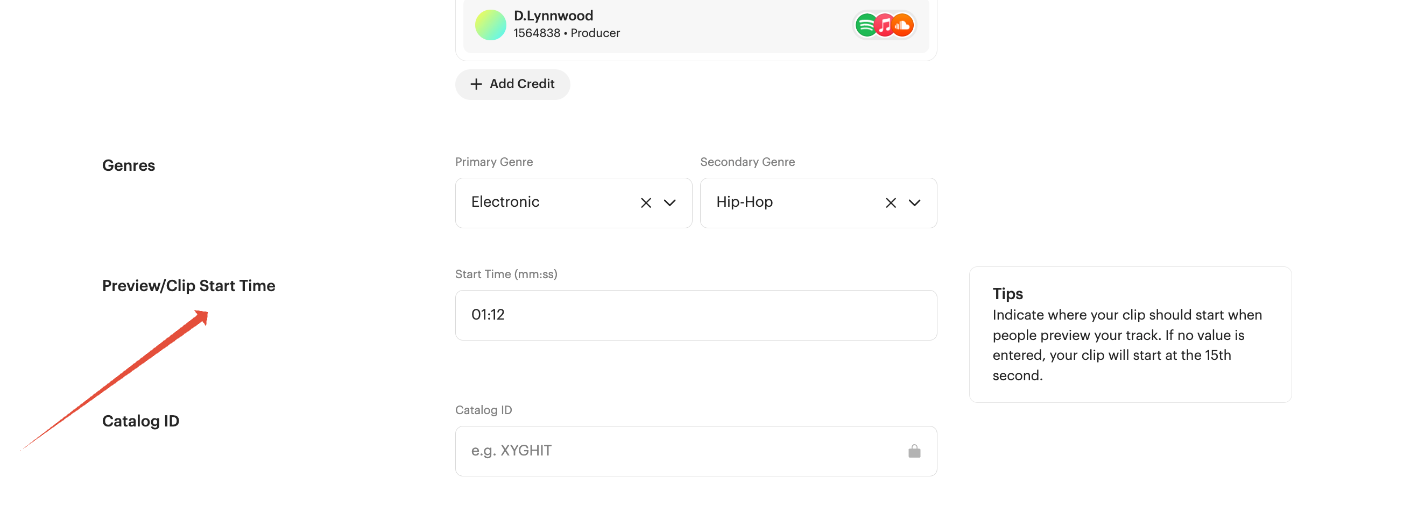
If you want a specific section of your track to be available (for example, the chorus instead of the introduction), you can set a custom Preview/Clip Start Time when creating or editing a track in Revelator.
Enter the start time in mm:ss format. For example, 00:45 starts the excerpt 45 seconds into the song. If no value is entered, the clip starts at the 15th second.
If the track has already been delivered, redeliver the update to TikTok.
| TipThe release date controls when your audio clip becomes available. The Preview/Clip Start Time controls where that excerpt begins within your song. |
Promoting a track on TikTok
If your artist has been safelisted and is still having trouble promoting their song, note the following:
| ImportantSafelisting does not grant commercial music rights for paid promotion. It does not override TikTok’s music duration limit or guarantee access to promotional tools. |
- The in-app Promote button has separate restrictions on copyrighted music, even when the artist owns the recording or has been safelisted.
- If you use TikTok Ads Manager, including Spark Ads, you must still have the necessary commercial permissions for both the sound recording and the underlying composition. Using Ads Manager does not bypass those requirements.
- Music outside TikTok’s Commercial Music Library may require separate licensing before it can be used in advertising.
.
Related articles
Was this article helpful?
That’s Great!
Thank you for your feedback
Sorry! We couldn't be helpful
Thank you for your feedback
Feedback sent
We appreciate your effort and will try to fix the article