Estimated revenue gives you an early view of what you're earning in the current period, before your royalty statements arrive. It appears on the Consumption page and is based on your recent streaming and video activity and what that activity has historically paid.
Royalty statements typically arrive around three to four months (sometimes longer) after the activity takes place, so this estimate helps you see roughly what you're owed in the meantime.
| Important This is an estimate, not a final figure. It will not match your statements exactly, and it reconciles against your actual revenue once statements arrive. Treat it as a guide to how the current period is trending. |
Where to find it
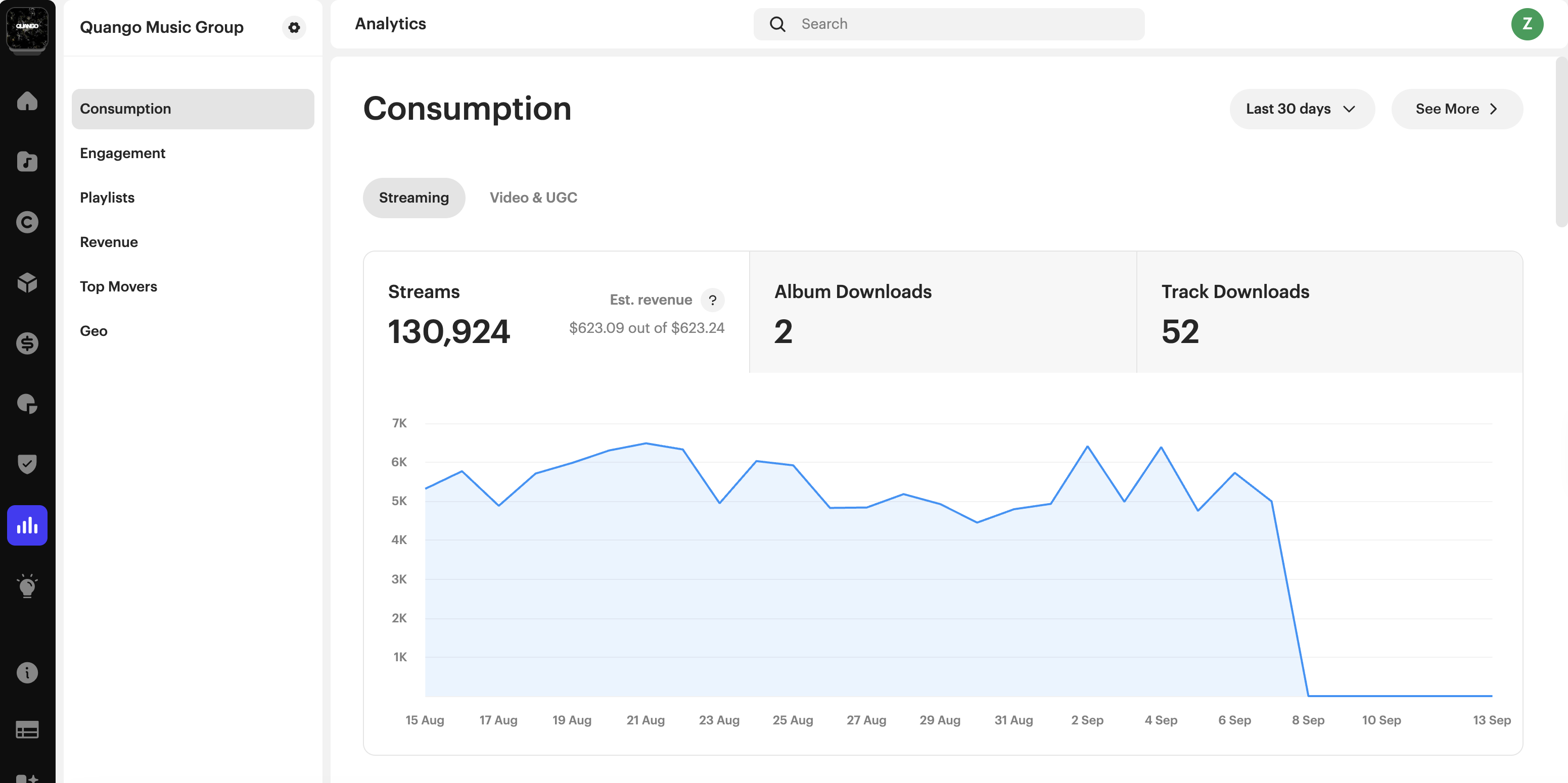
From the main navigation menu, click Analytics → Consumption. The estimate appears on both the Streaming tab and the UGC tab, inside the top metric card (Streams or Views).
It's displayed as Est. revenue, for example $2,457 out of $4,372.
What the two numbers mean
The estimate always shows two figures:
| Figure | What it shows |
|---|---|
| First number | Your estimated revenue from the activity on that tab. On the Streaming tab, this is your streams; on the UGC tab, this is your views. |
| Second number | Your total estimated revenue for the period, combining both streaming and UGC. |
For example, on the UGC tab, $500 out of $4,372 means an estimated $500 from views and an estimated total of $4,372 across streaming and views.
What the estimate covers
The estimate covers the most recent period that does not yet have complete statements: the last three months plus the current month. For example, in mid-September the estimate covers June, July, August, and September to date. Older periods settle once their statements arrive, and their actual revenue appears on the Revenue page instead.
The current month is shown up to the most recent available consumption data, which usually runs about three days behind.
| Note The estimate only appears when your selected date range includes this window. If you select a range that extends further back, the figure covers the estimate window only. If you select a range entirely before the window, the estimate is hidden. |
What's included
The estimate is based on activity types that have matching daily data:
- Subscription streaming
- Ad-supported streaming
- Claimed UGC (video)
It only covers stores that provide daily streaming or video data.
Only plays that qualify as a paid stream are counted. Plays under 30 seconds are not recognized as a stream by DSPs and are excluded from the estimate.
What's not included
Some income can't be estimated from daily activity and is not included in this figure:
- Downloads, sync, neighboring rights, radio, and other income that is not paid per stream or per view
- Earnings from stores that do not send daily data
These are always reconciled through your actual statements and appear on the Revenue page.
How the estimate is calculated
The estimate combines your recent daily activity with what that activity has historically paid, based on your own past statements. Streaming and video are estimated separately. Rates are applied at the level of individual store, market, and delivery type, because these are what make payout rates vary the most.
The estimate refreshes each month as new statement data arrives, keeping it aligned with your reported earnings. It's recalculated across the whole window at each refresh, so the figure can change as more data becomes available.
Estimated revenue vs. actual revenue
| Page | What it shows |
|---|---|
| Consumption | Estimated revenue for recent periods that are not yet settled |
| Revenue | Actual revenue from your statements, for periods that have settled |
Once statements arrive for a period, the actual revenue on the Revenue page is the figure to rely on.
Who can see it
Estimated revenue is available on the Consumption page for standalone, parent, and child accounts, and in the Artist and Label portals. It's not shown in the Payee portal, because Payee accounts do not have consumption data.
Frequently asked questions
Why doesn't my estimated revenue match my royalty statements?
It's an estimate, not a final figure. It's based on your recent activity and what that activity has historically paid, so it will always differ somewhat from your statements. It reconciles against your actual revenue once statements arrive. Rely on the Revenue page for confirmed figures.
Why has my estimate changed since I last looked?
The estimate is recalculated across the whole window each time new statement data arrives. As more data becomes available, the figure is refined, so it can move up or down between refreshes.
Why don't I see an estimate for older periods?
The estimate only covers the last three months plus the current month. Once a period settles, its actual revenue moves to the Revenue page and the estimate no longer shows for it.
Are plays under 30 seconds included?
No. Plays under 30 seconds are not recognized as a paid stream by DSPs, so they are excluded from the estimate.
Does the estimate include downloads, sync, or other income?
No. Only per-stream and per-view income from stores that send daily data is estimated. Downloads, sync, neighboring rights, radio, and similar income appear on the Revenue page once statements arrive.
Why isn't estimated revenue showing in the Payee portal?
Payee accounts do not have consumption data, so the estimate is not available there. It's available for standalone, parent, and child accounts, and in the Artist and Label portals.
Related articles
Was this article helpful?
That’s Great!
Thank you for your feedback
Sorry! We couldn't be helpful
Thank you for your feedback
Feedback sent
We appreciate your effort and will try to fix the article