Spotify's Artist Profile Protection lets artists review and approve releases before they appear on their Spotify profile. Artists who opt in are assigned a unique artist key. When your distributor includes this key at delivery, your releases are pre-approved and go live automatically.
Revelator supports storing your Spotify artist key directly on your artist profile. Once saved, the key is included in every Spotify delivery automatically.
| Note The Spotify Artist Profile Protection feature is currently in beta and available to eligible artists who have been invited by Spotify. If you have not been invited yet, releasing music works the way it always has. |
For more details, visit Spotify's support page.
Before you begin
|
Finding your artist key on Spotify
- Log in to Spotify for Artists.
- Go to Settings.
- Look for Artist Profile Protection.
- Your artist key is displayed on the Artist Profile Protection page.
| Note Only artists who have been invited to the beta and opted in will see Artist Profile Protection in their settings. If you do not see it, the feature is not yet available for your profile. |
Adding your artist key in Revelator
- Select the artist you want to update, or create a new artist.
- In the Link Spotify Profiles section, make sure a Spotify profile is linked. If not, link one first.
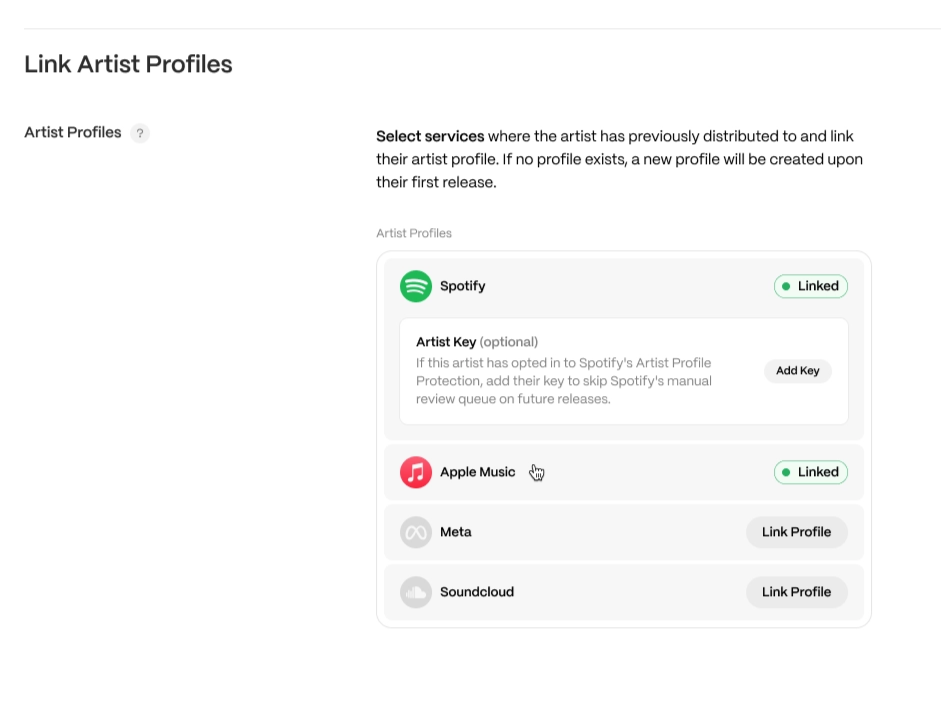
- Below the linked Spotify profile, you will see a notice: "If the artist has opted in to Spotify Artist Profile Protection, add their key to skip Spotify's manual review queue on future releases."
- Click Add Key.
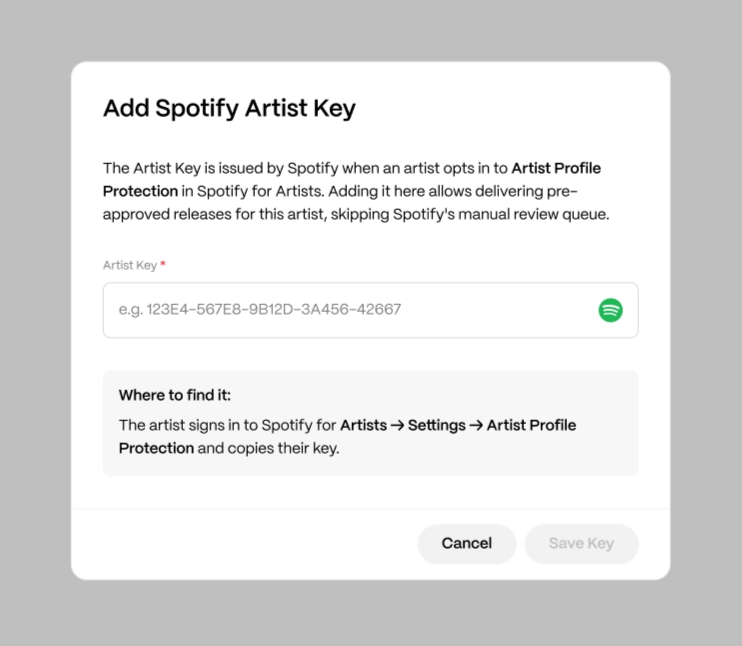
- Paste the artist key into the field.
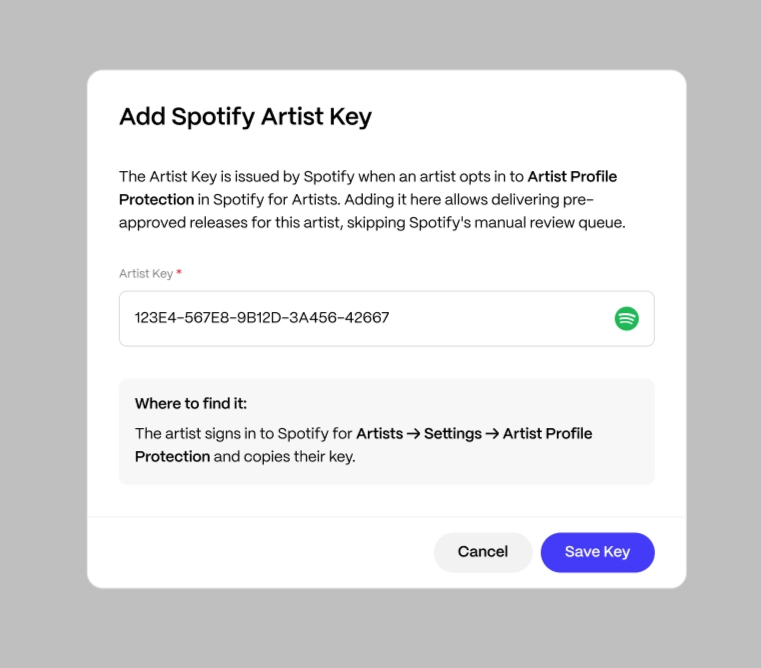
- Click Save.
| Important The key must match the correct format — five groups of uppercase letters and numbers separated by hyphens (e.g., 123E4-567E8-9B12D-3A456-42667). If the format is incorrect, an inline error will appear and the key will not be saved. |
Once saved, the artist key appears below the linked Spotify profile. All future Spotify deliveries for this artist will automatically include the key.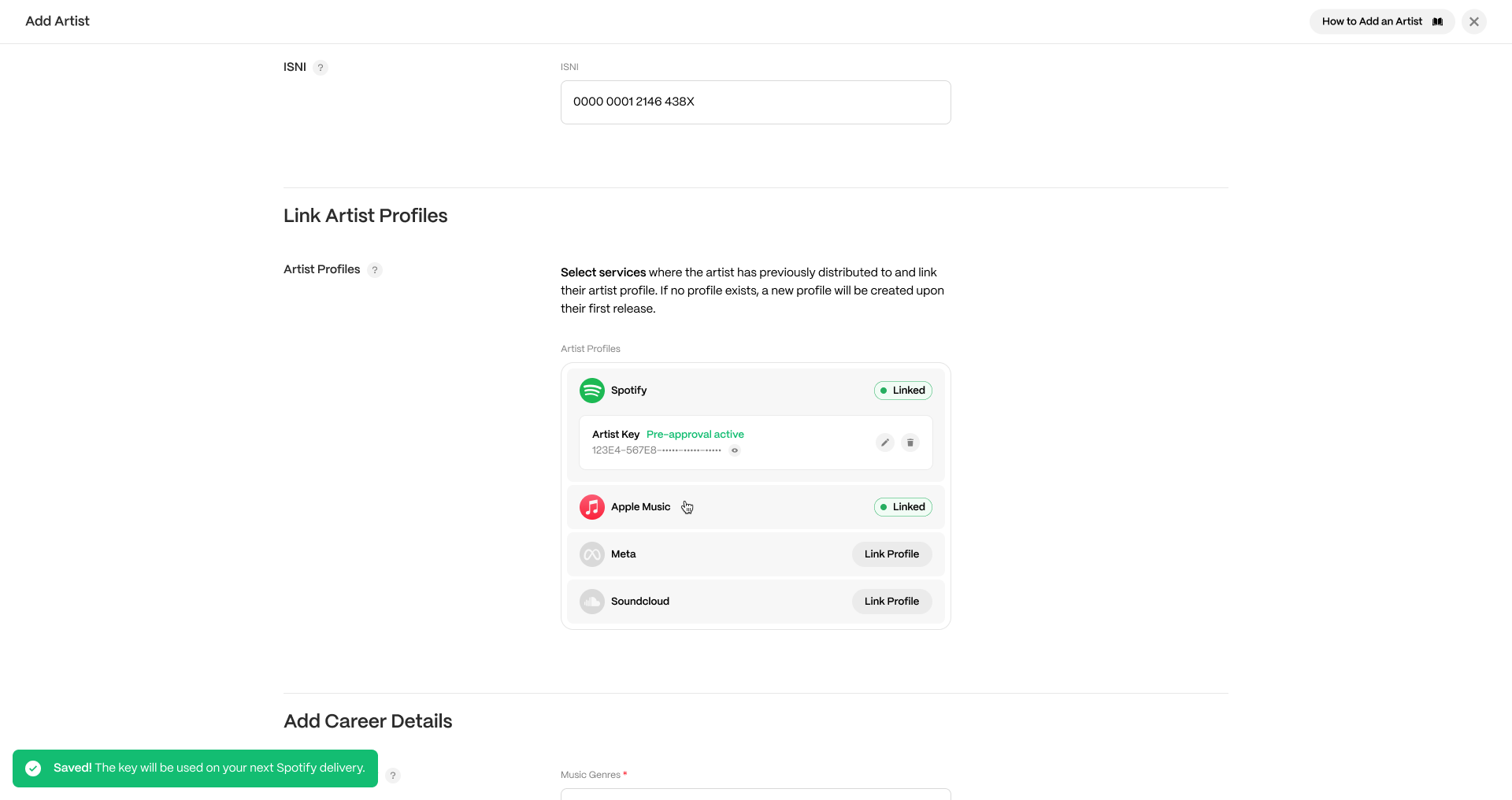
Editing or removing your artist key
To edit the key:
- Click Edit next to the saved artist key.
- Update the key and click Save.
To remove the key:
- Click Delete next to the saved artist key.
- Confirm the removal.
| Warning Removing the artist key means future Spotify deliveries will no longer include it. If the artist has Artist Profile Protection enabled, their releases will require manual approval on Spotify for Artists. |
What happens after you add the key
- Every Spotify delivery for the artist will automatically include the key.
- Releases are pre-approved on Spotify and go live without manual review.
- The key only needs to be entered once. It applies to all future Spotify deliveries for that artist.
- The key is only included in Spotify deliveries. It is never sent to other DSPs.
Frequently asked questions
What if the artist hasn't been invited to Artist Profile Protection?
Releases continue to work as they always have. The artist key field is available for when they are invited and opt in.
Can I add keys in bulk for multiple artists?
No. Each artist must opt in to Artist Profile Protection individually on Spotify for Artists and retrieve their own key. Keys are entered per artist in Revelator.
Can Revelator request access to Artist Profile Protection or obtain artist keys on my behalf?
No. Artist Profile Protection is managed entirely by Spotify. Revelator cannot request access, speed up invitations, or retrieve artist keys on behalf of artists or labels. If an artist has not been invited to the beta, this is determined by Spotify. For questions about eligibility or access, contact Spotify Support.
What happens if I deliver without a key for an artist who has Artist Profile Protection enabled?
The release will require the artist's manual approval on Spotify for Artists before it appears on their profile. It will not be rejected — it simply enters the approval queue.
Does the key replace the Spotify URI?
No. Both the Spotify URI and the artist key serve different purposes. The URI links the artist profile; the key handles release pre-approval. Both are included in Spotify deliveries.
Related articles
Was this article helpful?
That’s Great!
Thank you for your feedback
Sorry! We couldn't be helpful
Thank you for your feedback
Feedback sent
We appreciate your effort and will try to fix the article