Video Distribution on Revelator lets you upload music videos, package them into a release, and deliver them to Apple Music, iTunes, and Spotify, all from the same catalog you use for audio. As an account admin, you first enable Video Distribution and choose which of your clients can use it. After that, you and your clients can create videos, build releases, and distribute them.
Enable Video Distribution
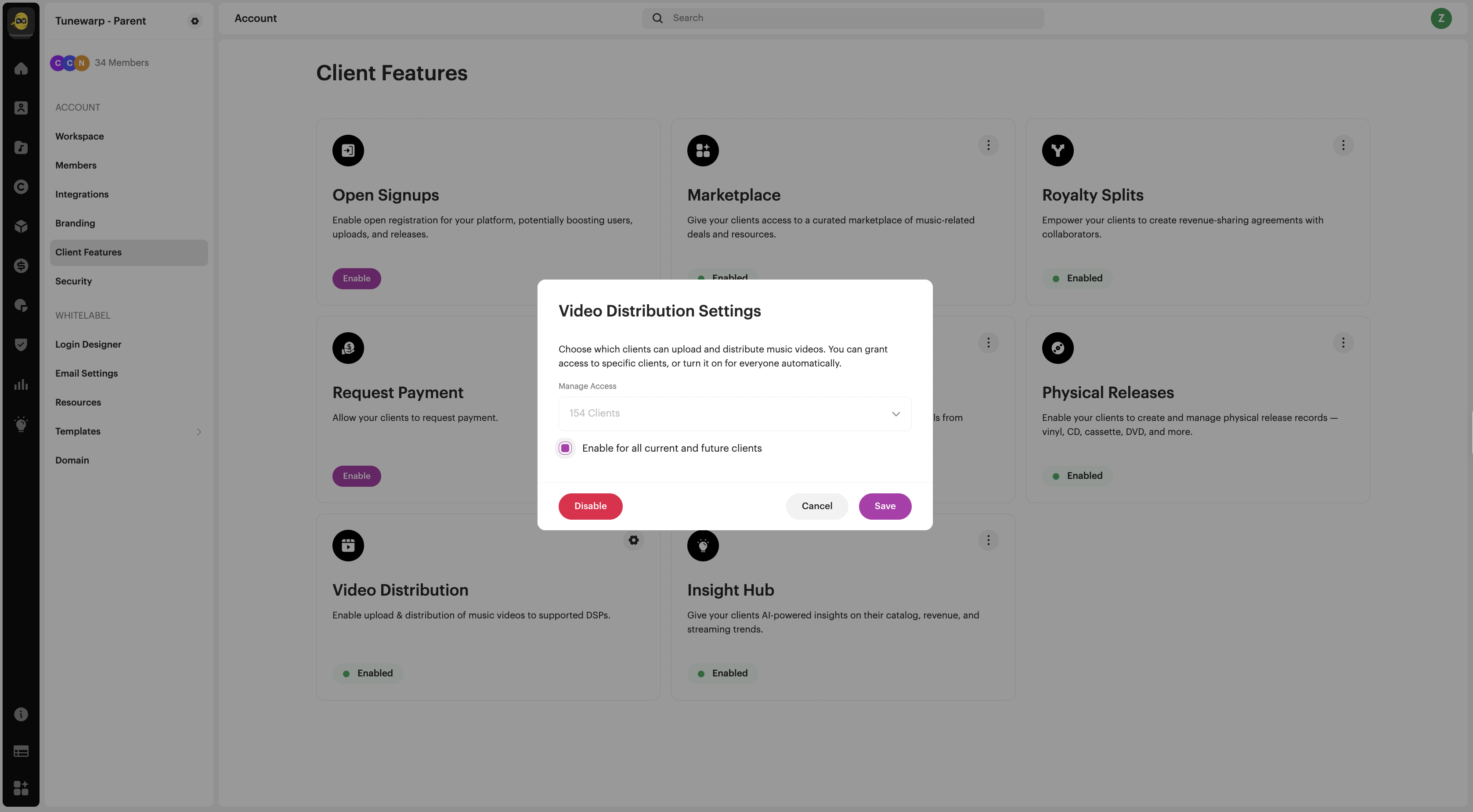
Before your clients can distribute video, enable Video Distribution for your account.
- From the main navigation menu, go to Account → Settings → Client Features.
- Find the Video Distribution card and click Enable.
Turn off Video Distribution for a specific client
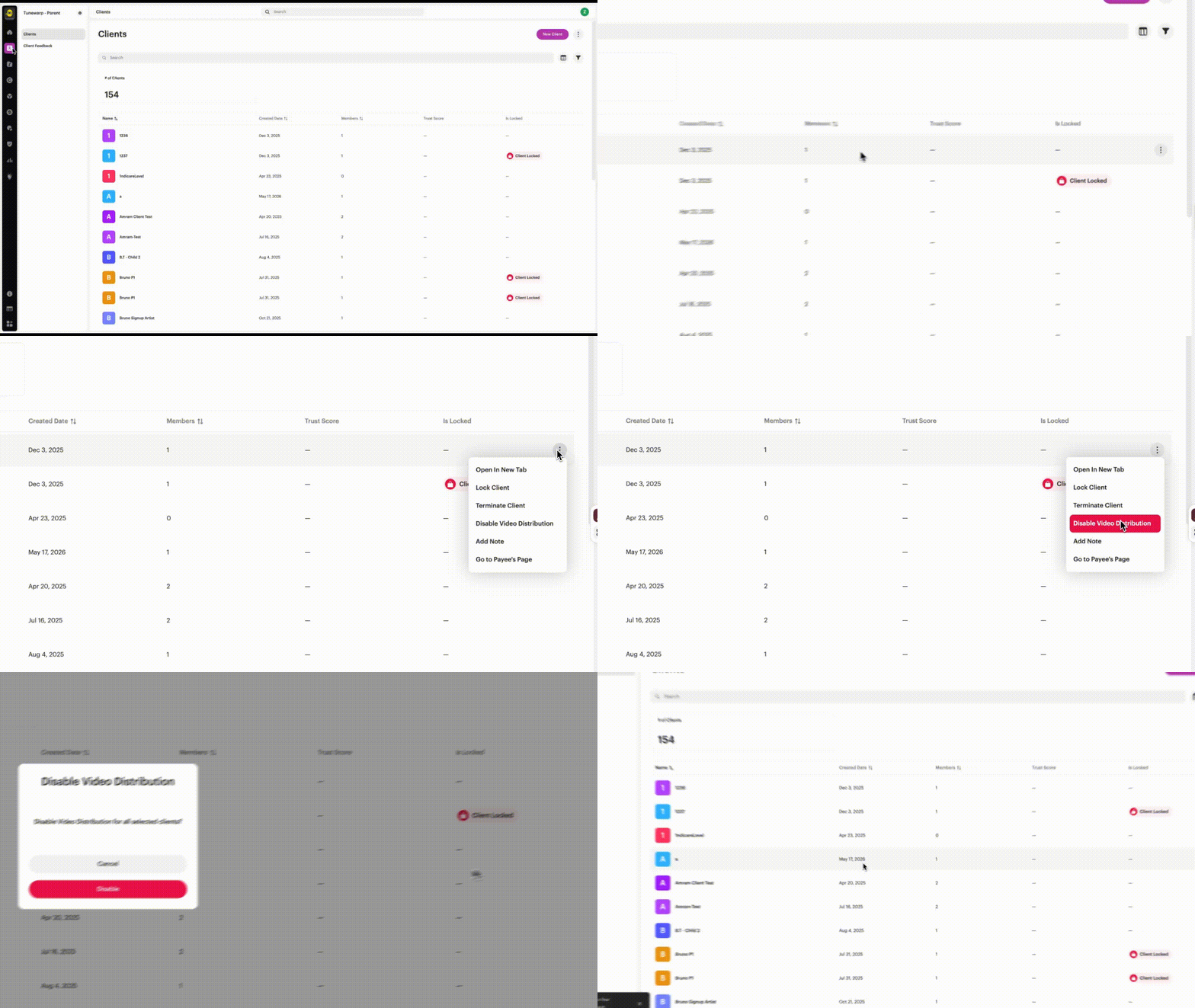
Even with Video Distribution enabled for your account, you can turn it off for an individual client. That client keeps any videos they have already distributed but can no longer submit new ones.
- From the main navigation menu, click Clients.
- Find the client in the list, or use Search to locate them quickly.
- Click the three-dot menu (⋮) at the end of the client's row.
- Click Disable Video Distribution.
| Note Disabling video distribution does not affect videos the client has already delivered. To turn it back on, open the same menu and choose Enable Video Distribution. |
What you can distribute
Video Distribution supports three release types:
- Video Single — a single music video.
- Video Album — multiple videos, in an order you set.
- Mixed Album — audio tracks and videos together in one release.
You can classify each video by type: Official Music Video, Performance Video, or Other.
Supported video content
Music videos should focus on a single song and be original video content that you hold the rights to distribute.
| Important Platforms set their own content rules. In particular, Spotify does not accept lyric videos or visualizers, each video must contain a single song, and content must be original (you must hold all rights and clearances). |
For the full requirements, see Spotify's Music Video Content Policy and Music videos on Spotify.
| Important — Spotify publishing rights (US streaming) Before a music video can stream in the US, every songwriter behind the underlying music must complete three steps with the relevant collectives: sign up for The Mechanical Licensing Collective (The MLC), register their musical works with The MLC, and opt in to Spotify's Direct Audiovisual Licensing Agreement through The Harry Fox Agency (HFA). If a songwriter has an exclusive publishing deal, their publisher usually handles these registrations. Once the steps are complete, it can take up to 7 days for the video to be enabled for streaming in the US. See Spotify's Music video publishing rights. |
Create a video
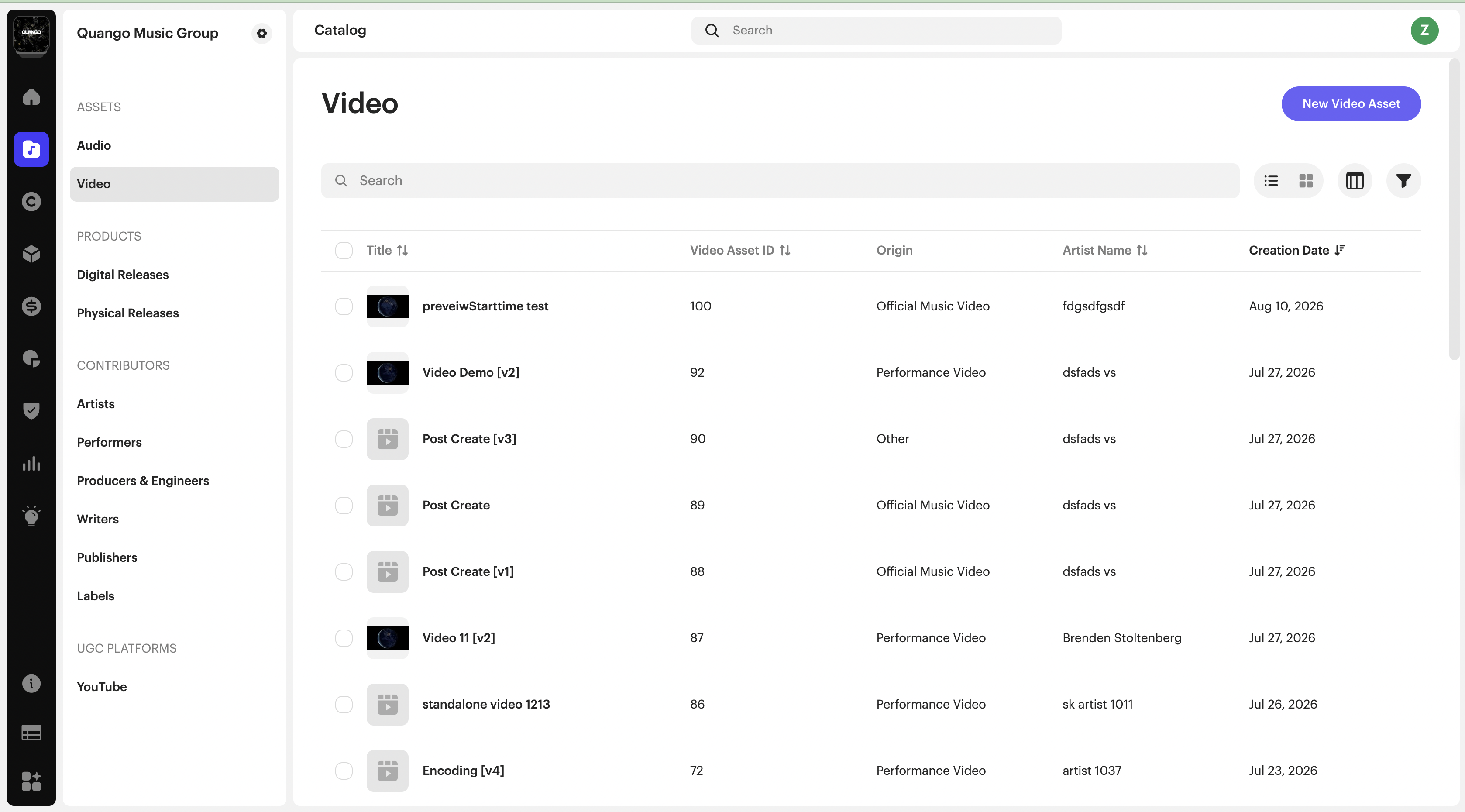
- From the main navigation menu, click Assets → Video.
- Click New Video Asset at the top right.
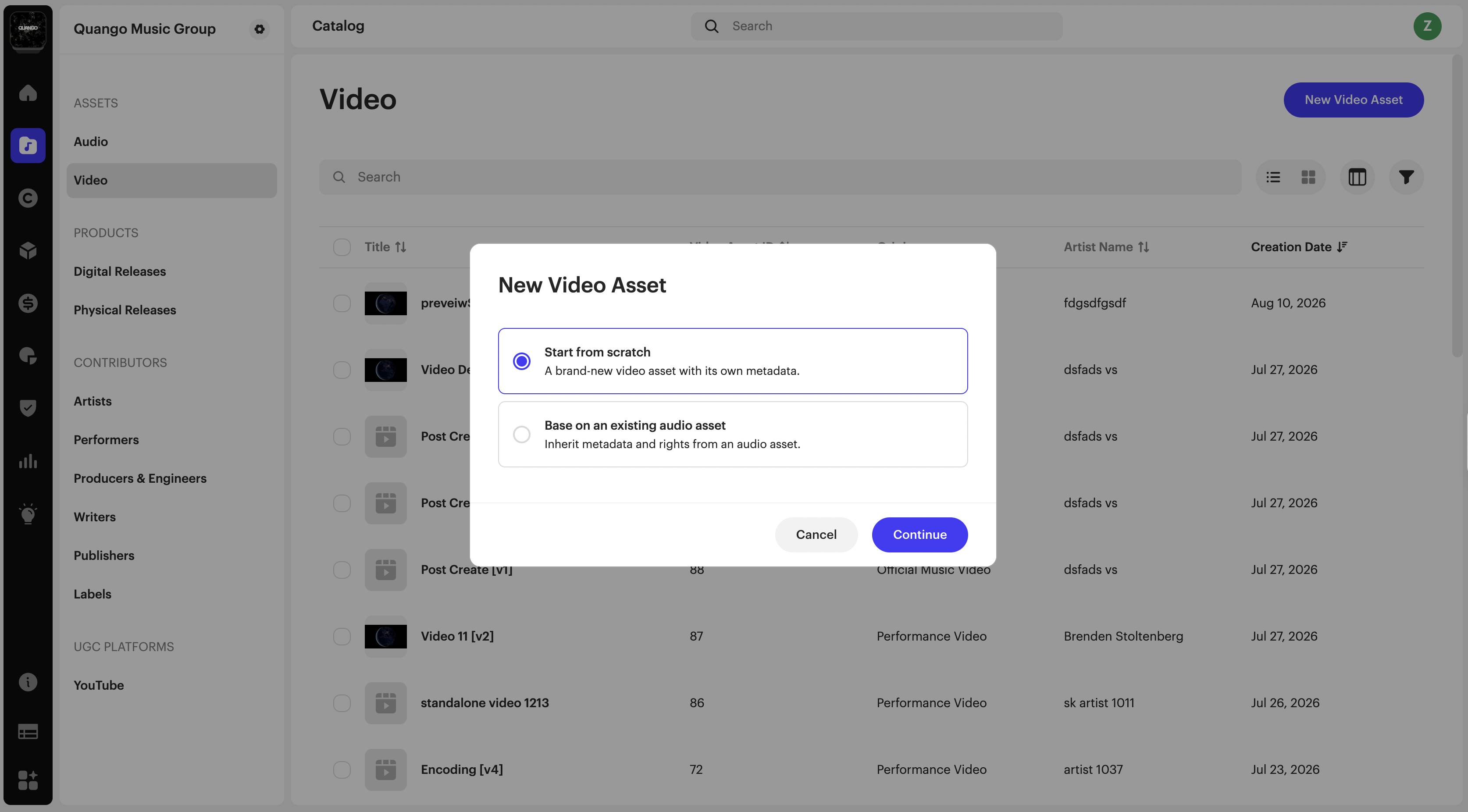
- Choose how to start:
- From an existing audio track — select a distributed audio track to carry over shared metadata such as artists, credits, and contributors automatically.
- Start from scratch — begin with an empty video and enter the metadata yourself.
- Upload the video file.
- Set the Thumbnail, the still image viewers see. Use Select Frame From Video to choose a frame (required), or Upload Thumbnail to add your own image (optional).
- Optionally upload a Captions file and set its Captions Language.
- Add the title, choose the Video Type (Official Music Video, Performance Video, or Other), and add artists and credits.
- Set Linked Recording to its audio track.
- Publishing Details — add writers, publishers, and any songwriting splits.
- Click Create.
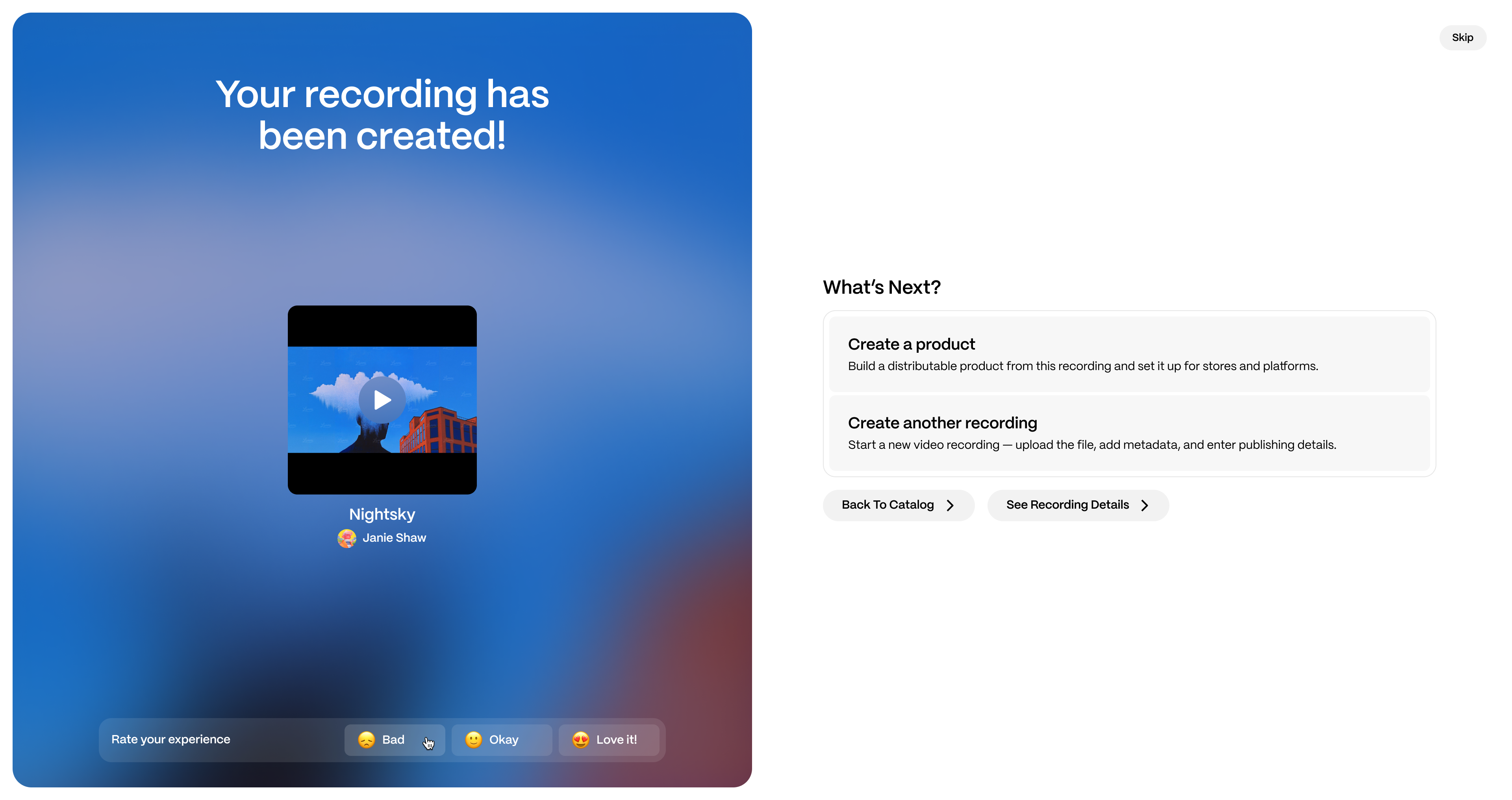
| Important — use a unique ISRC A music video is a separate asset from the audio recording, so it needs its own unique ISRC. Do not reuse the audio track's ISRC for the video — the video's ISRC must be different from the audio's. |
| Note You don't have to finish everything at once. You can save a video with only the minimum details and add the file, thumbnail, and remaining metadata later — they're required only when you distribute. Large video files are encoded after upload, which can take a moment. |
Build a video release
To distribute a video, you first package it into a release.
- From the main navigation menu, click Products → Digital Releases.
- Click New Release, choose Digital Release, and click Continue. The Create a new release wizard opens with three steps.
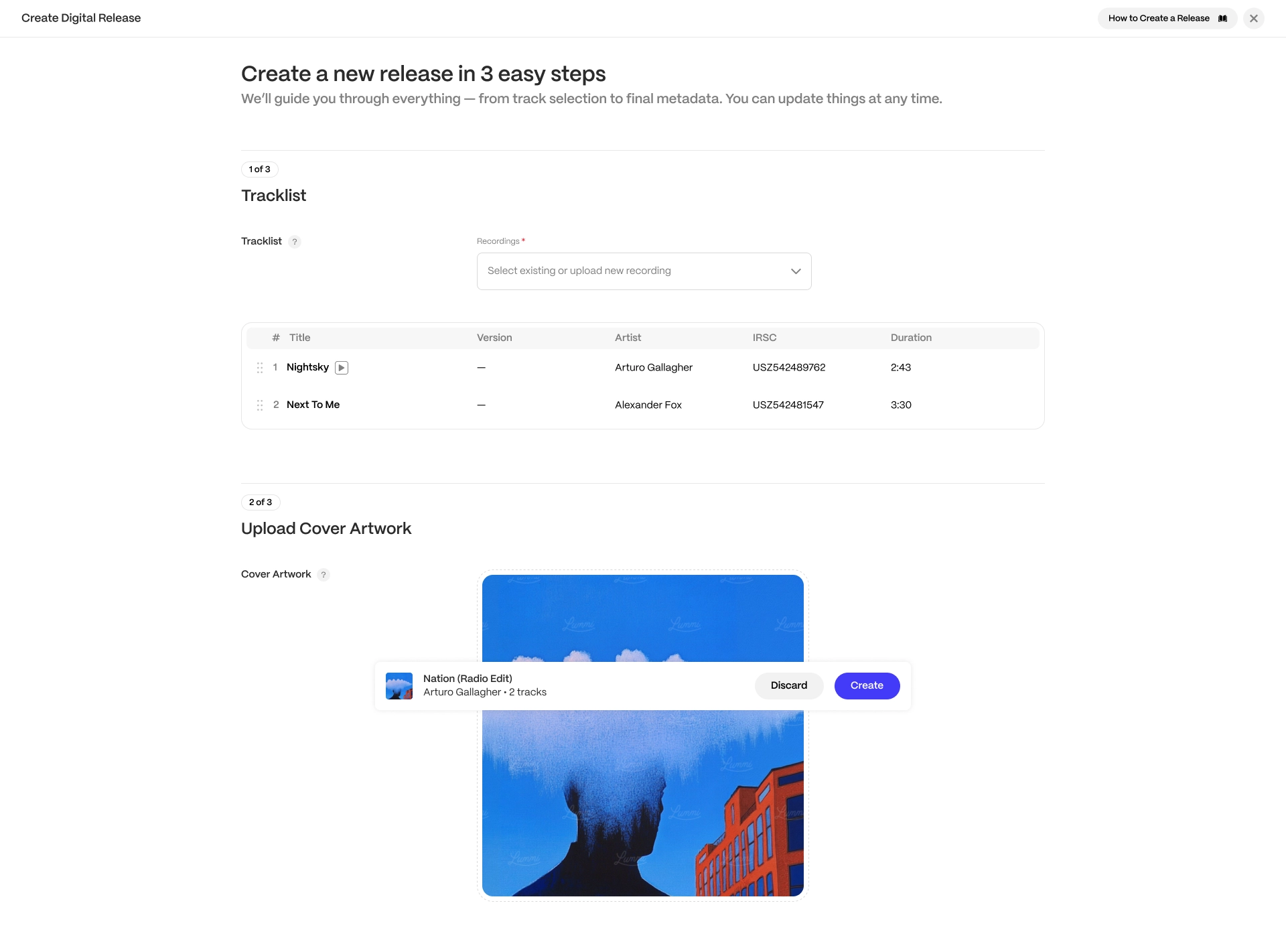
- Tracklist — use Select existing to add a video you already created, plus any audio tracks if you want a mixed release. Upload new recording is for audio files only, so if you haven't made your video yet, create it as a video asset first (see Create a video above). Your release becomes a Video Single, Video Album, or Mixed Album depending on what you add.
- Upload Cover Artwork — add the release cover.
- Enter Release Details — set the release title, artists, genres, release date, and other details. Turn on Prefill release information from track metadata to carry over what you already entered on the recording.
- Click Create.
Distribute your video
| Note If you deliver to Spotify through a direct agreement or through Merlin, video delivery is not enabled by default and requires Spotify's approval. To request activation or ask about your eligibility, please contact Spotify Support. |
| Note A release must be ready before it can go out. While it still has unresolved issues, the Distribution panel shows Fix issues instead of a distribute option; once everything is resolved, you'll see a green Distribution Ready badge and can distribute. |
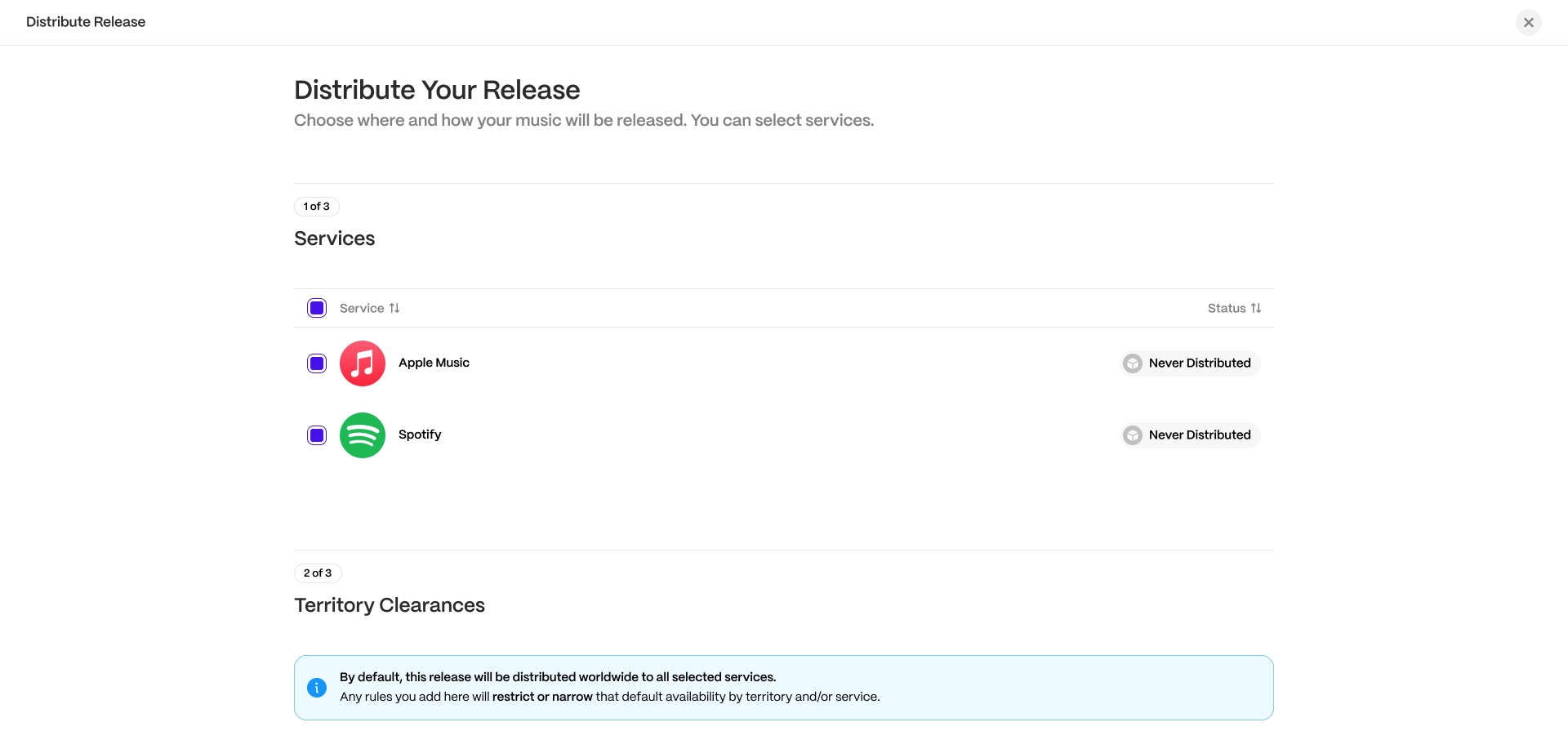
- Open the video release you want to distribute.
- On the Select Services step, choose your platforms.
- Set territories and any other options, then continue.
- If a selected platform has an unresolved requirement, either fix it or skip that platform.
- Click Distribute to submit.
Inspecting a release
When you distribute, the release goes to Inspection for review before it's delivered to the stores. If your account runs its own inspection, open the release in the Inspection view to check its details across the Release, Tracks, and Distribution tabs, fix anything that needs attention, and set services, territories, pricing, and the release date. When it's ready, choose Approve Release, or Fail & Return it for changes. Approving runs a final check of metadata, the Spotify Watchlist, and platform-specific rules.
| Note Videos are reviewed the same way as audio, and you can play the video right in the inspection view. |
Deliver videos to Vevo
- To submit videos for upload to Vevo, see our Vevo delivery guide.
- To create a Music Video asset on YouTube to generate claims (rather than just using the Sound Recording asset you distributed through Revelator), use one of these templates:
- Use this template if your video doesn't yet exist on YouTube.
- Use this template if your video already exists on YouTube.
| Warning Once you have created a Vevo video or a YouTube Music Video asset, it is critical that you also create it in your catalog. If you do not, the royalties for those videos will lack a corresponding asset to be matched to, so they will remain unallocated and unpaid. |
Frequently asked questions
Which platforms can I distribute music videos to?
Apple Music, iTunes, and Spotify.
What types of video can I distribute?
Official music videos, live performances, acoustic or studio sessions, covers, and alternate versions. Note that Spotify does not accept lyric videos or visualizers. See Spotify's Music Video Content Policy for details.
Does my music video need to be original?
Yes. You must hold all rights and clearances for both the video and audio content, and platforms reject content that is not original or that you do not have the rights to distribute.
Can I link my music video to my song on Spotify?
Yes. Open the video asset and set Linked Recording to the audio track. For Spotify, that audio track must already be distributed.
Does my music video need its own ISRC?
Yes. A music video is a separate asset from the audio recording, so give it a unique ISRC that is different from the audio track's ISRC. Don't reuse the audio ISRC for the video.
What publishing rights do I need for my video to stream on Spotify in the US?
Every songwriter behind the underlying music must sign up for The Mechanical Licensing Collective (The MLC), register their musical works with The MLC, and opt in to Spotify's Direct Audiovisual Licensing Agreement through The Harry Fox Agency (HFA). If a songwriter has an exclusive publishing deal, their publisher usually handles these registrations. Once complete, it can take up to 7 days for the video to be enabled for streaming in the US. See Spotify's Music video publishing rights for details.
I deliver to Spotify through a direct agreement or Merlin. Can I distribute video?
If you deliver to Spotify through a direct agreement or through Merlin, video delivery is not enabled by default and requires Spotify's approval. To request activation or ask about your eligibility, please contact Spotify Support.
| Need help? Contact support if you need assistance. |
Related articles
Was this article helpful?
That’s Great!
Thank you for your feedback
Sorry! We couldn't be helpful
Thank you for your feedback
Feedback sent
We appreciate your effort and will try to fix the article